Qwen3.8 27B Speed on Real Hardware, Measured by the People Who Ran It
Qwen3.8 27B runs at roughly 5 to 144 tokens per second depending on the hardware, and the biggest single factor is not the card: it is whether multi-token prediction is switched on. An RTX 5090 goes from 66 to 144 with one flag. A 3090 goes from 41 to 63 on a current build. An 8 GB laptop card manages 5. We measured none of this ourselves: every figure below is attributed to the person who published it.
Our companion page answers whether Qwen3.8 27B fits your card. This one answers the question that follows: once it fits, is it usable. Those are different questions and the second one is decided by things the file size never tells you.
Updated 31 August 2026. The ceiling moved again, and this time it did not move on an NVIDIA card. @pupposandro reports 227 tok/s on a single AMD Radeon AI PRO R9700 using Lucebox with a DFlash 2 draft, which is above the 206.1 tok/s that SGLang published on a 5090 and which this page carried as the ceiling for two weeks. At the other end, a 2017 Tesla V100 is now on the board at 56 tok/s. Eight measured runs have been added since the last update, including four on the DGX Spark, and the abliteration section below has a real answer now instead of a memory estimate. We refresh this page weekly while the tuning is still moving.
Single GPU, Measured
| Card | Build | Decode | Source |
|---|---|---|---|
| RTX 5090 32GB | paired A/B, MTP off then on | 66 to 144 tok/s, the current ceiling | @sudoingX table |
| RTX 5090 32GB | second unit, same method | 61 to 135 tok/s, +120% | @sudoingX table |
| RTX 5090 32GB | Q4_K_M, llama.cpp, no MTP | 78 tok/s empty, 76 at 8K, 71 at 32K | @witcheer |
| RTX 4090 24GB | paired A/B | 36 to 75 tok/s, +107% | @sudoingX table |
| RTX 4090 24GB | Q4_K_XL, q4_0 KV, with MTP | 65 tok/s | @analogalok |
| RTX 4080 Super 16GB | Q4_K_XL, llama.cpp, MTP | 50 to 70 tok/s | @baksalyar |
| RTX 3090 24GB | paired A/B, current build | 41 to 63 tok/s | @sudoingX table |
| RTX 3090 24GB | same card, launch-day build | 31.0 to 41.3 tok/s, +33% | @sudoingX, superseded |
| 3x RTX 3090 | tensor parallel | 49 to 96 tok/s | @sudoingX table |
| 2x RTX 5060 Ti | two flags stacked | 22 to 71 tok/s, 3.14x | @sudoingX table |
| RTX 5090 mobile 24GB | same method | 36.7 to 50.9 tok/s, +39% | @sudoingX |
| RTX A6000 48GB | same method, n=4 | 26.7 to 64.1 tok/s, +140% | @lingster, PR to @sudoingX |
| MacBook Pro M5 Max | MTPLX, peak | 73 tok/s peak, see caveats | @Youssofal_ |
| 2x RTX 3090, NVLink | FP8, MTP | 75 to 85 tok/s | @Tech2Wild |
| 2x RTX 3090 | W4A16 AutoRound, 262K context | 94 to 104 tok/s single stream | @Tech2Wild |
| RTX 5090 | NVFP4 plus DSpark, SGLang | 206.1 tok/s | SGLang, quoted by Qwen |
| MacBook M4 Max 64GB | 4-bit | ~15 tok/s, 32s prefill | @tomgreenwald |
| M3 Ultra | MLX, no MTP | 13 tok/s, 188 prefill | @CFC3DNC |
| RX 7900 XTX 24GB | paired A/B | 31 to 44 tok/s | @sudoingX table |
| Radeon AI PRO R9700 32GB | paired A/B | 27 to 47 tok/s | @sudoingX table |
| Ryzen AI Max APU | paired A/B | 11.5 to 23.7 tok/s, doubled | @sudoingX table |
| Radeon 890M iGPU | paired A/B | 2.7 to 5.7 tok/s, doubled | @sudoingX table |
| Ryzen AI Max+ 395 | AMD day-0 | 24.5 tok/s | AMD, via @TeksEdge |
| Radeon AI PRO R9700 32GB | Lucebox with a DFlash 2 draft model | 227 tok/s, the current ceiling | @pupposandro |
| 2x Radeon AI PRO R9700 | FP8, DFlash 2 | 130 tok/s | @CopenDeCamp |
| Tesla V100 32GB | llama.cpp with DFlash 2 | 56 tok/s on a 2017 card | @KyleHessling1 |
| RTX 4090 24GB | llama.cpp, current build | 87 tok/s | @analogalok |
| A100 | SGLang | 59.1 tok/s | @fahdmirza |
| DGX Spark | abliterated NVFP4, SGLang with DFlash 2 | 57.95 tok/s whole request, 4.71x over its own baseline | @filicroval |
| DGX Spark | NVFP4, SGLang with DFlash 2 | 57.11 tok/s whole request | @filicroval |
| DGX Spark | llama.cpp with DFlash 2 | 24.51 tok/s | @ViC305 |
| DGX Spark | SGLang with EAGLE, NVFP4, bf16 lm_head | 22.0 tok/s, median of 50 requests | Inference Atlas, @0xBakeer |
| RTX 3090 24GB | llama.cpp, current build | 40 tok/s | @ItsmeAjayKV |
| RX 7900 XTX 24GB | tinygrad, q4 KV, MTP | 71 tok/s | @splizard |
| RX 7900 XTX 24GB | llama.cpp Vulkan RADV, q8 KV, MTP | 48.5 tok/s, same card as the row above | @splizard |
| RTX 4060 8GB laptop | IQ4_XS, 64K, hybrid CPU offload, MTP | 5 tok/s decode, 150 prefill | @analogalok |
| Mac mini M4 Pro 24GB | thinking mode | 15.1 tok/s | @mertcobanov |
| DGX Spark | thinking mode | 12.6 tok/s | @mertcobanov |
| DGX Spark | SGLang | 38.28 tok/s | SGLang |
| Arc Pro B70 32GB | UD-Q4_K_XL, Unsloth Desktop with llama.cpp b11007 | 23.4 tok/s | Gigazine |
| Arc Pro B70 32GB | UD-Q8_K_XL, same machine | 15.9 tok/s | Gigazine |
Our Own Runs: a T4 and an L4 With the Window Full
Updated 3 October 2026. Every figure above was published by someone else. These are ours. On 2 October 2026 we ran Unsloth’s files on a 16 GB Tesla T4 and a 24 GB NVIDIA L4, on Linux with llama.cpp build b11062, one request at a time, flash attention on, no MTP and no draft model. Each run read one prompt filling 90% of the window and then wrote 64 tokens; llama.cpp’s own timings give both speeds. Sixty-four tokens is a short sample, so read the decode column as a reading of each setup, not a benchmark of it.
| Card | File | Prompt length, cache | Prompt read | Answer written |
|---|---|---|---|---|
| L4 24 GB | UD-Q4_K_M | 29K tokens, F16 | 647 tok/s | 13.1 tok/s |
| L4 24 GB | UD-Q4_K_M | 59K tokens, F16 | 495 tok/s | 11.8 tok/s |
| L4 24 GB | UD-Q4_K_M | 118K tokens, q8_0 | 352 tok/s | 8.8 tok/s |
| L4 24 GB | UD-Q4_K_M | 236K tokens, q4_0 | 217 tok/s | 6.1 tok/s |
| T4 16 GB | UD-Q3_K_XL | 15K tokens, F16 | 273 tok/s | not enough tokens to time |
| T4 16 GB | UD-Q3_K_XL | 29K tokens, q8_0 | 245 tok/s | 4.7 tok/s |
| T4 16 GB | UD-Q3_K_XL | 29K tokens, q4_0 | 242 tok/s | 6.7 tok/s |
| T4 16 GB | UD-Q3_K_XL | 59K tokens, q4_0 | 199 tok/s | not enough tokens to time |
Both are datacenter cards with slow memory for their size, 300 GB/s on the L4 and 320 GB/s on the T4, against about 1,000 GB/s on a 4090, which is why the answers come slower than on the gaming cards above. What they show that a short-prompt benchmark cannot is the cost of a full window: on the L4 a 236K-token prompt took about 18 minutes to read before the first word appeared. The memory each setup used is on the VRAM page.
It Now Ties a Frontier API on the Intelligence Index, and That Has a Speed Cost
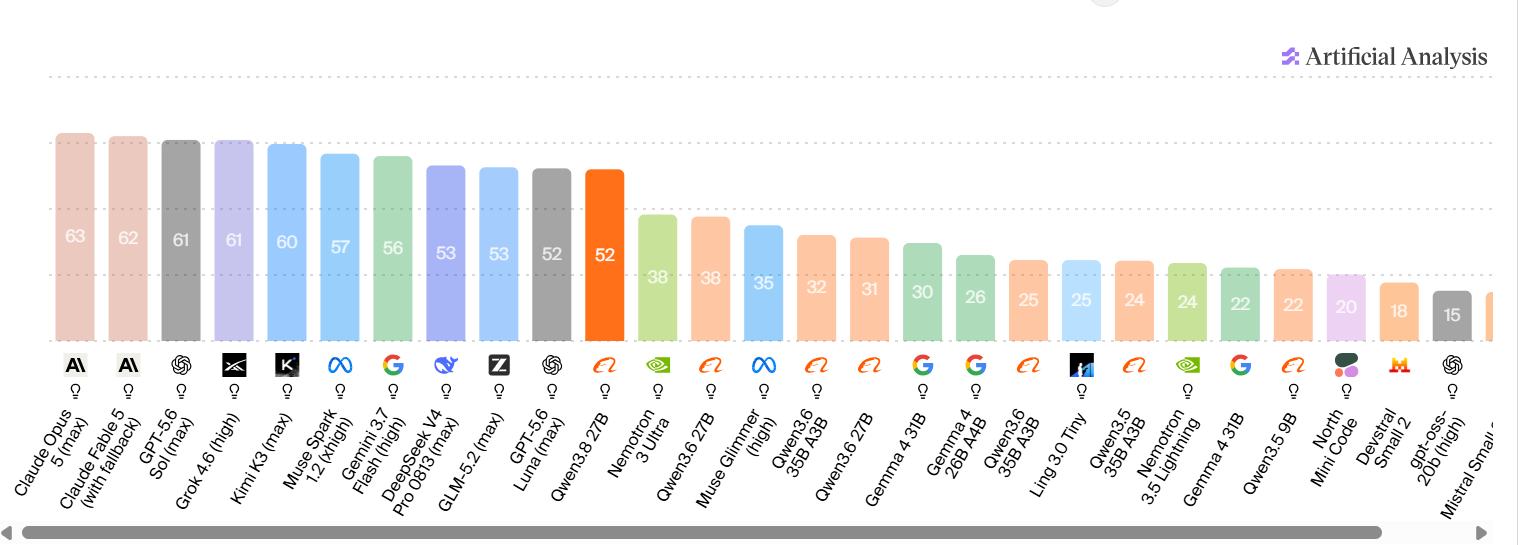
Artificial Analysis scored Qwen3.8 27B at 52 on its Intelligence Index on 17 August 2026. GPT-5.6 Luna (max) scores 52 on the same index. Qwen3.8 27B also ranks first of 135 open-weight models in the 4B to 40B class.
The index is a composite of nine evaluations: GDPval-AA v2, tau3-Banking, Terminal-Bench v2.1, SciCode, Humanity’s Last Exam, GPQA Diamond, CritPt, AA-Omniscience and AA-LCR. Those are Artificial Analysis’s numbers, not ours, and no independent replication exists yet.
The part that belongs on this page is what it costs to collect that score. Artificial Analysis reports that Qwen3.8 27B generated 160 million output tokens during evaluation against a median of 43 million, and flags it as very verbose.
Compare it to the model it ties with rather than to the field, though, and the gap shrinks. GPT-5.6 Luna (max) generated 130 million, which Artificial Analysis calls the higher end for its price tier. So against its actual peer, Qwen3.8 27B is about 23% more verbose, not close to four times.
| Qwen3.8 27B | GPT-5.6 Luna (max) | |
|---|---|---|
| Intelligence Index | 52 | 52 |
| Output tokens in evaluation | 160M | 130M |
| Price per million output tokens | your electricity | $1.20 |
On an API, verbosity is a bill. Locally it is decode time. That is the exchange rate this whole page is about. A 3090 running this model at 41 to 63 tok/s converts a reasoning-heavy answer into a wait rather than an invoice, and a card that doubles its throughput with the MTP flag halves that wait.
Which makes the reasoning-effort finding below the practical companion to the score, rather than a separate curiosity. A model this verbose, set to maximum reasoning effort, is the configuration most likely to leave you watching a cursor.
Turn the Reasoning Down, Not Up
The most repeated complaint about this model is not speed. It is that
on maximum reasoning effort it thinks itself into a corner and never finishes.
Default effort is the setting to run.
@LottoLabs documented it properly rather than anecdotally, running the same
two Terminal-Bench 2.1 tasks twice on the same 2x RTX 3090 rig with the same
quant, the same MTP head, the same 65,536 context and the same 50-turn agent
limit. The only variable was reasoning: off with budget zero, against XHigh with
an unlimited budget.
Both scored 1 of 2, and they failed in opposite directions.
On the adaptive rejection sampler task, the non-thinking run inspected the
environment, installed R, and had written the implementation file by its fifth
tool call, then ground through 76 bash calls debugging it. The XHigh run
thought so much it never wrote the code at all.
This does not mean reasoning is useless here. @mertcobanov reports the
opposite at the other end of the dial: running in thinking mode rather than the
plain default gave him a dramatic improvement, and he ran all four of his device
tests that way.
So the shape is a curve, not a switch. Thinking on is worth
having. Thinking with an unlimited budget is where the model stops shipping
output and starts looping. If you are wiring this into an agent with a turn
limit, that failure costs you the whole run, and it will look like the model is
slow when it is actually still deliberating.
A measured number landed on 21 August and it sharpens this, rather than reversing it. On a bounded budget, thinking is worth about thirty points on hard questions. See the section below. The dial still has a top end where the model stops shipping output, and the two findings are the same curve seen from opposite sides. A 4,800 task study landed on 22 August that settles where each one applies: reasoning pays on hard questions and is spent on agentic work. Both sections below.
The Quant Tax Is Nearly Zero on Short Prompts, and Very Real on Long Ones
We said on launch day that low-bit builds were where small-card owners
would pay for it. A measured ladder says otherwise and we are correcting it
here.
@witcheer scored seven GGUF rungs on one RTX 5090. From Q8_0 down to 2-bit
the whole ladder spans 2.9 points, with no cliff at any step.
Q6_K ties Q8_0 to the second decimal, which means the largest file on the ladder
buys nothing on this model.
The standout is UD-IQ3_XXS: 92.7 against Q8_0’s 93.7, from an 11.1 GB
file, at 96 tok/s. That puts a dense 27B inside a 16 GB card’s budget at
close to full quality. Even the 9 GB 2-bit floor holds 90.8, and its losses
concentrate in MMLU and HumanEval rather than spreading evenly.
On that evidence his picks were UD-Q4_K_XL on a 24 GB card, UD-IQ3_XXS on 16 GB, and skip Q8_0 entirely.
Then He Tested It at Depth, and the Picture Changed
Short prompts are what benchmarks measure and not how anybody uses a local model. So he buried a single fact in 16k, 32k and 64k tokens of noise and required the model to find it and use it.
| Build | Retrieval at depth |
|---|---|
| Q6_K | 45 of 45. Perfect at every depth. |
| UD-IQ3_XXS | 33 of 45. A quarter missed, at every depth |
Two rungs that sit one point apart on short prompts are twelve tasks apart once the context is full. The damage never shows up in the scores everyone quotes, because those scores are measured on prompts short enough to hide it.
So the guidance splits by how you actually work, and this split is his:
- Short chats and quick code questions. The small rungs are a bargain. Near-full quality inside a 12 GB budget.
- Long sessions, large documents, an agent working your repo. Depth-test the exact file you plan to run. The full ladder below shows why size will not tell you.
The Rest of the Ladder Landed, and It Says Size Is the Wrong Axis
We wrote that the smaller the file, the more depth risk you carry. The completed table says that is wrong, and we are correcting it here. Every rung, 15 retrieval tasks at each of 16k, 32k and 64k, thinking off:
| Rung | File | 16K | 32K | 64K | Total |
|---|---|---|---|---|---|
| Q6_K | 21.3 GB | 15/15 | 15/15 | 15/15 | 45/45 |
| UD-Q4_K_XL | 16.7 GB | 15/15 | 15/15 | 15/15 | 45/45 |
| Q4_K_M | 15.9 GB | 15/15 | 15/15 | 15/15 | 45/45 |
| UD-IQ2_M | 9.6 GB | 15/15 | 15/15 | 15/15 | 45/45 |
| UD-IQ2_XXS | 8.4 GB | 11/15 | 13/15 | 15/15 | 39/45 |
| UD-IQ3_XXS | 11.1 GB | 11/15 | 10/15 | 12/15 | 33/45 |
The 9.6 GB file is perfect at every depth. The 11.1 GB file misses a quarter of the tasks. The smaller one wins, by a wide margin, and it is not a fluke: he reran UD-IQ3_XXS and got the same score with the exact same tasks missed both times. Every 4-bit build is also perfect.
So the depth tax follows the quantization recipe, not the file size. How a file was compressed matters more than how much. That is his conclusion and the table supports it, which means the only safe way to pick for long-context work is to test the specific file you intend to run. Q8_0 has no 64k figure: at 27 GB plus that cache it does not fit the 32 GB card it was measured on.
Note what this does not change. The published file sizes still run larger than naive arithmetic predicts at the bottom of the ladder, which is a fact about bytes on disk and a separate axis from quality.
And note how fast this moved. We published the short-prompt result and the depth result arrived the same day, from the same person, pointing the other way. That is the state of nearly every number on this page, which is why it carries a date.
The Whole Ladder Against Full Precision
He then ran the original BF16 checkpoint through the same board. At 54.7 GB it does not fit a 5090, so it took three nights of partial offload, and it is the reference the rest of the ladder was missing. q_avg is his five-task board, MMLU, ARC-C, HellaSwag, GSM8K and HumanEval. Thinking off, greedy, llama.cpp b9653 with flash attention on an RTX 5090.
| Rung | File | q_avg | GPQA-diamond |
|---|---|---|---|
| BF16 reference | 54.7 GB | 93.5 | 48.5 |
| Q8_0 | 27.0 GB | 93.7 | 47.0 |
| Q6_K | 21.3 GB | 93.7 | 49.0 |
| UD-Q4_K_XL | 16.7 GB | 93.5 | 49.0 |
| Q4_K_M | 15.9 GB | 93.2 | 50.5 |
| UD-IQ3_XXS | 11.1 GB | 92.7 | 45.0 |
| UD-IQ2_M | 9.6 GB | 91.5 | 39.4 |
| UD-IQ2_XXS | 8.4 GB | 90.8 | 42.9 |
Q4_K_M tops the hard column at 50.5, above the 54.7 GB original. Do not read that as a 16 GB file beating full precision. GPQA-diamond is 198 questions, which he puts at a noise band of about three points, so everything from 45.0 to 50.5 is one flat band and the ordering inside it is not signal. What the reference does settle is the direction: at 4-bit and up you are not measurably behind the original checkpoint, and the two smallest files genuinely are.
Numbers, method and the rerun receipts are in his report at notwitcheer/llm-bench-rig. Single seed, deterministic decode, one machine, and he says so himself.
Thinking Mode Is Worth Three Times What the Quant Choice Is
Updated 21 August. @witcheer re-ran three rungs of the same ladder with thinking mode on. Same harness, zero-shot greedy, a 16k reasoning budget, GPQA-diamond.
| Build | File | Thinking off | Thinking on |
|---|---|---|---|
| Q8_0 | 27 GB | 47.0 | 80.8 |
| Q6_K | 21.3 GB | 49.0 | 79.3 |
| UD-IQ3_XXS | 11.1 GB | 45.0 | 78.8 |
Thirty to thirty four points, on every rung. On this same benchmark the whole eight-rung ladder spans 11.1 points, from UD-IQ2_M at 39.4 to Q4_K_M at 50.5. So the setting is worth about three times the file you picked, and the 11.1 GB build with reasoning on lands two points off the 27 GB one, inside the noise.
It also retires the depth penalty in the section above. With thinking off, the 3-bit file fell to 67% retrieval at 32k while Q6_K held 100. With thinking on, it goes 45 of 45 across 16k, 32k and 64k. Whatever long-form reasoning leans on, dynamic 3-bit quantization appears to keep it, at depth included. That is his result on his harness, and it is one run rather than a replicated finding, so treat the direction as firmer than the decimals.
What nobody attaches to that thirty points is what it costs in time, and this page has the speeds to price it. A 16k reasoning budget is 16,384 generated tokens before the answer starts. Against the measured decode rates in the table at the top:
| Machine and figure from this page | Full 16k budget |
|---|---|
| RTX 5090, UD-IQ3_XXS at 96 tok/s | about 2 minutes 51 seconds |
| RTX 4090, Q4_K_XL with MTP at 65 tok/s | about 4 minutes 12 seconds |
| M3 Ultra, MLX without MTP at 13 tok/s | about 21 minutes |
A budget is a ceiling, not a bill. Most answers spend far less than the whole 16k, and the ceiling only binds on the hardest questions, which are exactly the ones the thirty points came from. The honest way to read the two tables together: on a fast card, bounded reasoning is close to free and you should leave it on. On a machine in the low tens of tokens per second, the same setting is the difference between an answer and a coffee break, and that is a choice about your afternoon rather than about quality.
The practical read has not moved: size the file to your card, then spend the headroom on context, then turn bounded reasoning on. The file you pick is the smallest of those three decisions.
The Largest Quant Comparison Anyone Has Published on This Model
Updated 22 August. @superalesha ran five full production stacks of this model for 67 hours on 4x RTX 3090: 4,800 tasks, 10,120 requests, 14.5 million reasoning tokens, no token caps anywhere. Not five sets of weights, five stacks: FP8 and NVFP4 W4A16 and AWQ INT4 on vLLM, GGUF Q4_K_M on llama.cpp, and NInfer on a single 3090. Each ran at reasoning off, low, medium and xhigh.
At xhigh effort, on the full suite:
| Stack | pass@1 |
|---|---|
| AWQ INT4 | 90.0% |
| NVFP4 | 89.3% |
| GGUF Q4_K_M | 89.3% |
| FP8, the baseline | 88.7% |
| NInfer | 88.0% |
Three 4-bit stacks scored at or above the 8-bit baseline, and he reports McNemar putting first and last place in a statistical tie. Read that as a two point band with no signal inside it, not as 4-bit beating FP8. It is the same conclusion the GGUF ladder above reached, arrived at on different hardware with a different harness and a far larger sample.
The number that should change what you do is about effort, not quantization. GGUF Q4_K_M scored 89.3% at low effort and 89.3% at xhigh. Identical. Low spent 86,000 reasoning tokens getting there. xhigh spent 651,000.
Across all five stacks, xhigh burned 7 to 11 times the reasoning tokens of low. On this suite it bought nothing.
This does not contradict the thirty points above. It bounds them. witcheer measured GPQA-diamond, 198 graduate-level science questions where the model has to reason its way to an answer it cannot look up, and there bounded thinking was worth about thirty points. superalesha measured agentic and coding work, where the model has tools, a repository and a task, and there effort past low is spent rather than used. Same model, opposite advice, because the jobs are different. Turn reasoning on for the hard question. Do not turn it up for the pull request.
One more thing worth carrying, because it is the honest shape of these numbers. A single task in his suite, CLI-33, defeated every stack: NInfer thought for 174,000 tokens, NVFP4 for 171,000, GGUF for 140,000, AWQ for 120,000, FP8 for 93,000. Nearly 700,000 reasoning tokens spent across five stacks, zero solutions. Effort is not a dial that eventually reaches the answer.
What this is and is not. His figures, his rigs, his harness, published with the method attached. We ran none of it. The suite is his own, so the absolute pass rates are not comparable to a public leaderboard, and the useful part is the comparison between stacks rather than the number itself.
The Flag That Doubles Your Speed
The spread above is not mostly about the card. It is about whether multi-token prediction is running.
Qwen3.8 ships with MTP tensors trained into the weights, and unsloth’s GGUFs kept them: the blk.*.nextn.* tensors are inside the file you already downloaded. On launch afternoon llama.cpp was loading and then ignoring them, which @sudoingX found by reading the server logs, and his first figure that day was 25.4 tok/s on a 3090.
The runtime was never the problem. llama.cpp added draft-mtp speculative decoding in PR #22673 back in July, a month before this model existed. Everything needed was in place on release night and nobody had connected it. By that evening @ItsmeAjayKV had published the flags:
--spec-default --spec-type draft-mtp
--spec-draft-type-k q8_0 --spec-draft-type-v q8_0
No separate draft model is needed, which is the unusual part. Speculative decoding normally means running a second small model alongside the big one. Here the drafter is inside the checkpoint. His report was a doubling of decode speed, and @baksalyar independently reports 50 to 70 tok/s on a 16 GB 4080 Super with the same approach.
So a number measured before those flags existed is a floor, not a result. If you are comparing two speed figures for this model, check which side of MTP each one sits on before drawing any conclusion from the gap.
How Deep to Draft Depends on Your Card
@sudoingX then ran the thing properly, and his controlled baseline came out higher than that first pass: a paired A/B on the same file, same server, same streaming client, with the probe script published at github.com/sudoingX/qwen38-mtp under Apache 2.0 so other people could repeat it. His results, and one that arrived as a pull request from @lingster, someone he had never met:
| Card | MTP off | MTP on | Change |
|---|---|---|---|
| RTX 3090 24GB | 31.0 | 41.3 | +33% |
| RTX 5090 mobile 24GB | 36.7 | 50.9 | +39% |
| RTX A6000 48GB | 26.7 | 64.1 at n=4 | +140% |
The A6000 row is not measured like the two above it, and his repository says so: unsloth Q8_K_XL at 256K context with a q8_0 cache, against Q4_K_M at 131K with a q4_0 cache for the 24 GB cards. Read it as a separate result rather than a bigger version of the same one.
--spec-type draft-mtp --spec-draft-n-max 2 --parallel 1Two Variables Nobody Reports, and They Move the Numbers
Sampling temperature. @Youssofal_, who wrote MTPLX, is blunt
about it: many runtimes quote greedy decoding at temperature 0 as a speed
number, which he calls a vanity metric because nobody generates that way in
practice. He spent eight hours calibrating MTPLX’s draft heads for
temperature 1, which is what Qwen actually ships, and says that
at temperature 0 he could have advertised 100 tok/s instead of 73.
Reasoning mode. @mertcobanov ran all four of his machines in
thinking mode. A figure measured in thinking mode and one measured in the plain
default are not the same measurement.
Check that a figure states both before comparing it. When you compare two numbers from
different people, assume they differ on both before you assume the hardware is
the reason.
Draft Depth: Your Card Sets the Ceiling, Your Workload Sets the Rest
The interesting part of his sweep is not the headline. Deeper drafting helps code and hurts prose, and the overall median hides it. On the 5090 mobile:
| n-max | Overall | Code prompts | Prose prompts | Acceptance |
|---|---|---|---|---|
| 2 | 50.9 | 56.4 | 42.5 | 0.76 to 0.82 |
| 3 | 48.3 | 59.4 | 37.9 | 0.68 |
| 4 | 47.3 | 60.2 | 33.4 | 0.65 |
Code gets faster as the draft deepens. Prose gets slower, and faster than code gains. The reason is acceptance: a deeper draft is a longer guess, and a rejected guess is wasted work. Code is predictable enough to guess well and prose is not.
The A6000 sweep shows the same shape further out. It peaks at 64.1 overall at n=4 rather than n=2, and its code prompts kept climbing to 84.3 at n=6 while prose fell to 37.4. That is the second dial: a 48 GB card absorbs a deeper draft than a 24 GB one before the rejected guesses cost more than they save. @sudoingX states it as 24 GB cards peaking at n=2 and 48 GB wanting n=4.
Both dials matter and they stack. Your card sets the ceiling, 2 on a 24 GB card and 4 on a 48 GB one. Your workload decides where you sit under it, deeper for code and shallower for prose. For a 24 GB card his own advice is the line to follow: run 2 as your daily, 3 if the session is pure code.
There Is a Second Speculator, and It Costs Memory
MTP is not the only speculative path. A separate DSpark draft model exists for this checkpoint, and the two are easy to confuse because both make it faster.
| MTP | DSpark | |
|---|---|---|
| What it is | drafter trained into the weights | separate 1.36B draft model |
| Extra VRAM | about 1.4 GB | 2.72 GB for the model, plus its buffers |
| Runtime | llama.cpp | SGLang |
| Target build | the GGUF you already have | Qwen3.8-27B-FP8 |
The DSpark speculator is RadixArk/Qwen3.8-27B-DSpark, 5 layers and 1,359,284,737 parameters in BF16, and it is what SGLang’s 206 tok/s figure on a 5090 was using alongside NVFP4 weights. It had over 9,000 downloads within a day.
Neither speculator is free. The A6000 measurement in @sudoingX’s repository puts the MTP cost at about 1.4 GB, going from 40.0 GB to 41.4 GB when the flag is enabled, because the draft path needs its own buffers. DSpark costs the 2.72 GB of the draft model on top of whatever it allocates at runtime.
On a 24 GB card both come out of the same budget as your context window, so both are a trade: faster decode against a shorter conversation. MTP is the cheaper of the two and needs no extra download, which makes it the better first move on a consumer card.
The Local LLM Sizing Guide. Issue 1, 30 September
Speed starts with fit. Know what fits your card before you tune it.
Every model sized for every card from 8 GB to 128 GB, with the context each cache type holds, and what each speed switch is worth from real before-and-after runs, credited.
From $9 a month. Card or crypto. The next issue included.
DFlash 2 Is the Second Doubling, and It Stacks With the First
MTP was August’s answer. DFlash 2 is this week’s, and the two are not the same trick. MTP is trained into the weights you already downloaded. DFlash 2 is a separate draft model that runs alongside them, so the speedups compound rather than compete.
The measurements, all from the people who ran them, collected in our full write-up of DFlash 2:
| Hardware | DFlash 2 off | DFlash 2 on | Measured by |
|---|---|---|---|
| NVIDIA A100 | 28.9 | 59.1 | @fahdmirza |
| DGX Spark | 12.37 | 24.51 | @ViC305 |
| RTX 4090 24GB, 30K context | MTP baseline | 87.05 | @analogalok |
| RTX 4090 24GB, 110K context | MTP baseline | 83.35 | @analogalok |
The two 4090 rows are the ones to read carefully. They are not DFlash against nothing. They are DFlash on top of an MTP baseline, which is why they sit above every MTP figure in the table further up this page. They also barely move between 30K and 110K context, which is the same flat curve this model shows without any drafter at all.
Decode Doubles. Prefill Halves. Only One of Those Is Being Posted
@ViC305’s run is the only one that measured both halves, and the second half is the one missing from every thread about this:
| DGX Spark | DFlash 2 off | DFlash 2 on |
|---|---|---|
| Decode | 12.37 | 24.51 |
| Prefill | 73.38 | 37.62 |
The draft model reads your prompt too. That is the whole mechanism. A second model prefilling the same tokens costs roughly what the first one costs, and at a 54.2 percent acceptance rate on that run, half the drafted tokens are thrown away.
Which way the trade goes depends on what you wait for. In an agent session, fifty short turns, you wait on decode, and doubling it is the right trade every time. Paste a 40K-token file in and ask one question, and you wait on prefill, where the same setting now costs you. Same flag, opposite result, decided entirely by prompt shape.
One tester measured this. @analogalok’s 4090 matrix reports prefill at 1,725 to 1,789 tok/s, but every row there runs DFlash 2, so there is no off-baseline on that card and the regression is neither confirmed nor ruled out there. Treat the DGX Spark figures as one clean measurement, not as a law.
What It Costs You in Memory
A second model on the card is a second model on the card. The drafter is 3.85 GB at full precision and 1.14 GB as a Q4_K_M GGUF, and that GB comes out of the same budget as your context.
@analogalok’s 110K run totalled 23.96 GB on a 24 GB card. That is not a fit with room. That is the last 40 MB of a 4090, with no display attached, and it is exactly the configuration our GPU checker now flags in red rather than calling it a pass.
Runtime support is still landing. The work is open pull requests rather than shipped releases: vLLM #52816, SGLang #35371, llama.cpp #27342, and a fork of oMLX. If your runtime is on a stable release today, none of these numbers are available to you yet, and that is the honest caveat on the whole section.
Two Newer Engines: TensorFold and cafe-llama.cpp
Updated 3 October 2026. Two engines that did not exist when most of the figures above were taken now run this model faster than the stacks they were measured on.
TensorFold drafts several tokens at a time and keeps every reply byte for byte the same as plain decoding. On one DGX Spark, with the same NVFP4 weights and DFlash 2 drafter on every engine, @WescheNex1q measured one request at 83 tok/s on TensorFold against 60 on SGLang and 57 on vLLM. Its weak spot was many users at once, and 0.6.1 fixed it: on the same Spark, 16 requests went from 62 tok/s in total to 372, with the first token in 0.3 seconds instead of 117. On an M4 Max the three Mac engines tie once they use the same DFlash 2 drafter, 154, 146 and 146 tok/s on the same number-heavy prompt, and all three fall to 29 to 31 tok/s with drafting off. On an RTX PRO 6000 the project’s own 0.6.1 notes put one stream at 1.4 to 2.0 times vLLM with MTP.
cafe-llama.cpp is a llama.cpp fork that wires up the MTP layer mainline llama.cpp still ignores. Its author reports this model going from 40 to 80 tok/s with it, and the README’s recommended setup gives about 65 tok/s on one RTX 3090 24 GB. Its advice on the one setting that matters: four draft tokens is the sweet spot, and seven or more halves decode on CUDA.
It Runs on Intel, and the Spread Is the Software
Every figure above this point is NVIDIA or Apple. Intel’s 32 GB workstation cards are the cheapest route to that much memory, so the obvious question is what the model actually does on one.
Reddit user u/JinsooJinsoo published a full configuration and results on an Arc Pro B70, relayed by @TeksEdge: Qwen3.8 27B at INT4, vLLM on the XPU backend, graph mode, FP8 KV cache, one active sequence.
| Draft depth | Decode tok/s |
|---|---|
| No MTP | 33.34 |
| MTP1 | 46.64 |
| MTP2 | 53.48 |
| MTP3 | 54.31 |
| MTP4 | 52.62 |
It peaks at 3 and then goes backwards, and that is the same shape @sudoingX found on NVIDIA. Put the three together and a rule appears: 24 GB peaks around n=2, this 32 GB card at n=3, a 48 GB A6000 at n=4. Draft states cost memory, so the depth you can afford scales with the card. Generic advice to set n=4 is wrong for most people reading this.
Context barely moves it: 54.67 at 32K, 54.61 at 65K, 53.56 at 131K. About 2% lost between 64K and 131K, which is the same flat curve this model shows on every other card.
The Caveat That Will Get Dropped When This Is Reposted
That MTP setup needed two local compatibility patches to a vLLM release candidate. It is not stock vLLM, and the person who published it says so plainly. On a stable release today you do not get these numbers.
There is now a figure for the ordinary stack. Gigazine ran this model on an Arc Pro B70 Creator 32GB under Windows 11 with Unsloth Desktop and its bundled llama.cpp b11007, nothing patched: 23.4 tok/s at UD-Q4_K_XL, using 30.0 GB of the card and 1.0 GB of shared system memory. The 8-bit file on the same machine gives 15.9 tok/s at 30.2 GB. So the patched vLLM path is worth about 2.3 times the stock one on this card, and the stock one is still usable. Their card cost 298,054 yen against RTX 5090s above 900,000 yen in Japan, which is the reason to care about 32 GB from Intel at all. You can see the size of that gap in the same thread. @kasparsbulins reports 17 tok/s for the same model on an Arc Pro B65 under llama.cpp, and roughly 17 to 20 with MTP.
Same Bandwidth, Triple the Speed
Here is the part worth sitting with. Intel’s own specifications give the B65 and the B70 the same 608 GB/s on the same 256-bit bus. The B70 has more compute, 32 Xe-cores against 20, but decode is bound by memory bandwidth, not compute.
So a 3x spread between 17 and 54 tok/s cannot be the silicon. It is the runtime, the backend, the KV cache precision and the draft depth. Two people with nearly identical cards, one running llama.cpp and one running patched vLLM with speculative decoding, and the gap between them is larger than the gap between most GPU generations.
Which is the honest summary of this whole page: on this model, in this month, what you run it with matters more than what you run it on.
Dense Versus MoE, and Why Your Machine Decides
The most useful measurement anyone published was not about Qwen3.8 alone. @tomgreenwald ran it against Nemotron 3.5 Lightning 30B-A3B on the same MacBook M4 Max, exploring the same repository with the same 6,000 token prompt.
| Model | Prefill | Generation | RAM at 4-bit |
|---|---|---|---|
| Qwen3.8 27B, dense | 32 sec | ~15 tok/s | ~18 GB |
| Nemotron 3.5 Lightning 30B-A3B, MoE | 6 sec | ~70 tok/s | ~18 GB |
Same memory, five times the speed. The reason is that a dense model runs all 27 billion parameters for every token it produces, while that mixture-of-experts model runs about 3 billion. Total parameters decide how much memory you need. Active parameters decide how fast it goes.
That splits cleanly by hardware, and both @tomgreenwald and @TheAhmadOsman arrived at the same conclusion independently on the same day:
- Consumer RTX cards suit dense models. Lots of compute, fast memory, limited capacity. Qwen3.8 27B is aimed squarely here. In @tomgreenwald’s words, the 3090 is still the best value in local AI.
- Apple silicon and unified memory suit MoE models. Large capacity, decent bandwidth, weak compute. A dense 27B fits comfortably and then crawls at 10 to 20 tok/s.
- DGX Spark suits large MoE models. 128 GB holds things a consumer card cannot, with fast prefill and slow generation.
If you have an M3 or M4 Mac and you want speed, a well-chosen MoE will beat this model on your machine by a wide margin at the same memory. That is not a criticism of Qwen3.8. It is what dense means.
The M5 Max is a different story and it deserves its caveats stated plainly. @Youssofal_ reports 73 tok/s peak on a MacBook Pro M5 Max using MTPLX, a stack he wrote and publishes at MTPLX.com in three tiers: Bare Speed at 15.98 GB, Optimized Speed at 20.37 GB, and Optimized Quality at 29.43 GB. Community re-quantizations of it were already accumulating downloads within a day.
Four things to hold alongside that number. It is a peak rather than a sustained figure. The M5 Max is newer silicon than the M4 Max measured above, so the two are not a like-for-like comparison. The stack is the author’s own, which is not a criticism but is worth knowing. And the quantization was not stated in the post, which a reply had already asked about when we checked.
What it does establish is that the Apple picture is moving quickly, and that a number measured on an M3 or M4 with a general-purpose runtime is not the ceiling for Apple silicon on this model.
Prefill or Generation: Which One You Actually Need
Two numbers get quoted for every model and most comparisons only use one.
Prefill is how fast it reads your prompt, and it is limited by raw compute. Generation is how fast it writes the answer, and it is limited by memory bandwidth. On the 4090 measurements, prefill sits around 2,650 tokens per second while generation sits around 40.
Which matters depends on what you are doing. A chat exchange is a short prompt and a long answer, so generation dominates. An agent reading a codebase is an enormous prompt and a short answer, so prefill dominates. That is why the MacBook result above looks so bad for agent work specifically: 32 seconds of prefill before a single token appears, on a 6,000 token prompt, and agents send far larger ones than that.
Context Barely Slows the Answer. It Does Slow the Prompt
This is the part where the architecture earns its keep, and it is unusual enough to be worth checking yourself.
Of Qwen3.8 27B’s 64 layers, only 16 use full attention. The other 48 hold a fixed-size recurrent state that does not grow as your conversation does. So filling the context window costs memory, but it barely costs speed.
@analogalok’s ladder on a single 4090 holds decode between 40.68 and 40.96 tok/s from 80,000 tokens all the way to 260,000. @sudoingX reports 25 tok/s on an empty context and 26 at 90,000 deep, and notes that no other 27B has done that on his bench. @witcheer measures a 9.6% drop from empty to 32,000 on a 5090.
One setting does slow it down, and we measured that ourselves. A q4_0 KV cache is the usual way to fit a long window on a small card, and on our own Tesla T4 run it cost about 20% of decode speed at 32,000 tokens while costing nothing at an empty context. That was on the ternary Bonsai 2 build of this model, so treat it as the direction rather than the exact figure for your file: what a quantized cache costs. A conventional model slows down noticeably as context fills. This one mostly does not, and if you work with long documents or long agent sessions that matters more than the headline number.
Reading the prompt is a different story, and we measured it. On our L4, the same 4-bit file read a 29K-token prompt at 647 tok/s and a 236K-token prompt at 217 tok/s, a third of the rate, so the full window took about 18 minutes before the first word. With the cache kept at F16, writing the answer slowed by 10% from 29K to 59K, which agrees with the testers above; the larger drops at 118K and 236K in our table come with a q8_0 and then a q4_0 cache. For agent work, where the prompt is the big part, budget for the prompt rate at the length you actually send.
What It Costs in Memory at Each Context
Measured by @analogalok on one RTX 4090, using unsloth’s Q4_K_XL build:
| KV cache setting | Context | VRAM |
|---|---|---|
| F16, unquantized | 80,000 | 22.36 GB |
| F16, unquantized | 100,000 | 23.59 GB, his stated ceiling for 24 GB |
| q8_0 | 130,000 | 22.18 GB |
| q8_0 | 170,000 | 23.68 GB |
| q4_0 | 260,000 | 23.00 GB, no system RAM offload |
The full 262,144 token context fits on a 24 GB card, and it needs a quantized KV cache to do it. @sudoingX independently ran the same thing on a 3090 at about 22.2 GB.
One honest note about our own tool. Our calculator returns figures roughly 1 to 2 GB above those measurements for llama.cpp setups. That is the safe direction, since a tool that asks for more card than you need costs you nothing but a wider margin, but it is a real gap and we are working on it with the measurements above. If our page says a configuration needs 24.5 GB and you have 24, it is worth trying.
What to Actually Run
For a single 24 GB card, the configuration @ItsmeAjayKV published is the current consensus:
llama-server -m Qwen3.8-27B-Q4_K_M.gguf
  -ngl 999 -fa on --jinja
  --spec-default --spec-type draft-mtp
  --spec-draft-type-k q8_0 --spec-draft-type-v q8_0
  --cache-type-k q8_0 --cache-type-v q8_0
  --temperature 1.0 --top_p 0.95 --top_k 30
Two things that command leaves out. It sets no explicit context length, so add -c with the value you want. And it does not load --mmproj, so vision is off. If you want image or video input you need that separate file, which costs another 0.93 GB.
Reasoning effort is worth knowing about too. @jtdavies reports that with reasoning off the model scores slightly below Qwen3.6 27B on cognitive tests, and at medium it is, in his words, seriously good. Thinking costs tokens and time, so the setting is a real trade rather than a free win.
The DGX Spark Now Has Four Numbers, and They Disagree by 2.6x
Four people have now published a decode figure for this model on a DGX Spark, and the spread between them is larger than the spread between most different cards. 22.0, 24.51, 57.11 and 57.95 tok/s, on identical silicon.
All four use speculative decoding, so that is not the variable. What settles it is the baselines, and they are the most reassuring numbers on this page: @filicroval measured 12.3 and 12.34 tok/s unaccelerated on his own box, and @ViC305 measured 12.37 on his. Three independent baselines inside 0.07 of each other. The hardware is not in question at all.
Everything above that is configuration. DFlash 2 returned 2x for @ViC305 on llama.cpp, and 4.63x and 4.71x for @filicroval on SGLang, on a stock and an abliterated build. The Inference Atlas run at 22.0 uses EAGLE on SGLang instead, with a bf16 lm_head, and is a median over 50 requests rather than one session, which makes it the most carefully measured and the slowest. The speculative method and the engine both move the number, and a headline figure shows neither.
One caveat on both of his figures, 57.11 and 57.95, in his own words: they are whole-request completion throughput including prefill and time to first token, not isolated decode figures. They are not directly comparable to a decode-only number without saying so.
One of these has been reproduced, which is rare here. @count_slopula ran @filicroval’s recipe on his own Spark and reports roughly 35 tok/s in general use with peaks around 72. That is a wider band than the original post, and a second person getting the same order of magnitude is worth more than a third person getting a bigger number.
The lesson generalises past this card. If a speed figure does not say which speculative decoding it used and which build it ran on, it is not comparable to any other figure on this page.
A sibling model proved that again on 20 September, and it is the cleanest demonstration we have seen. Qwen3.8-Flash-Next is a different model to the 27B on this page, so none of these numbers belong in the table above. What transfers is the shape. @ViC305 published an ExLlamaV3 recipe for one DGX Spark. @yume_arasaki ran it on his own Spark, at the same commit, and measured 79.5 tok/s on the same 400-token code job against the 79 Cruz published, with 74% of drafts accepted against 73%. He then retracted his own earlier figure for that model, 48.6 tok/s, because it was the same silicon running a worse recipe.
Same box, same weights, 48.6 against roughly 80 on comparable work. Nothing about the hardware changed. The fix was a generator on the request thread, a batch size, and four flags. That is the entire thesis of this section, measured by two people who had every reason to disagree. The memory side of that build is covered in Qwen3.8 Flash Next VRAM requirements.
Abliterated Builds: What They Cost in VRAM
Abliterated versions of Qwen3.8 27B appeared within hours and there are now a lot of them, with mradermacher publishing another as recently as 31 August. This is a memory question like any other, so here is what they actually take.
On this model the speed question has an answer, and it is that abliteration costs nothing. @filicroval served three NVFP4 builds on one DGX Spark with SGLang and DFlash 2: the stock RadixArk build and two abliterated ones. Without speculative decoding all three ran at 12.3 tok/s (12.34, 12.31 and 12.33). With DFlash 2 the Huihui abliterated build reached 57.95 tok/s against 57.11 for stock, 4.71x and 4.63x their own baselines. He pinned revisions, published sha256 sums, ran a frozen quality gate that scored 24 of 27 with and without speculative decoding, and included a reproduction script.
One thing did cost him speed, and it is worth knowing before you build one: the second abliterated build reached only 3.36x, and it keeps its lm_head in bf16. He puts the gap down to that single tensor rather than to the abliteration.
At full precision the abliterated build is exactly the same size as the original. Blackfrost-AI’s BF16 release and Qwen’s own both hold 27,781,427,952 parameters in 18 shards, 55.56 GB, and the shard sizes match file for file. Abliteration edits weights in place. It does not add or remove any.
The GGUF builds are where file size stops telling you anything. On 25 September 2026, four publishers’ Q4_K_M builds of the untouched base model and two abliterated ones compared like this:
| Publisher | Q4_K_M | Build |
|---|---|---|
| unsloth (UD dynamic) | 16.46 GB | base |
| lmstudio-community | 16.81 GB | base |
| bartowski | 17.44 GB | base |
| ggml-org | 18.97 GB | base |
| 0bserverx | 16.55 GB | abliterated |
| Blackfrost-AI | 16.81 GB | abliterated |
2.51 GB separates two builds of the same untouched model, and Blackfrost’s abliterated file is the same size as lmstudio’s base file to two decimal places. At Q8_0 Blackfrost’s file and unsloth’s standard one are both 29.05 GB. The gap is the quantizer, not the abliteration. An earlier version of this section compared Blackfrost’s abliterated files against unsloth’s standard ones, found them consistently smaller, and suggested missing multi-token prediction tensors as the cause. Checking more publishers killed that idea, and the table it rested on has since expired: unsloth deleted its plain Q4_K_M on 19 August, and Blackfrost re-uploaded every quant on 16 August with the native MTP head embedded.
Vision survives abliteration: Blackfrost’s repository ships its own mmproj at 0.93 GB, plus a smaller 0.63 GB Q8_0 version.
So if you are choosing between them, the practical question is not the file size. It is whether the MTP flag still works, because that is worth far more than the space it saves. Check for blk.*.nextn.* tensors in whichever file you pull, or simply run the flag and see whether the server reports a draft model.
A second measurement landed on 21 September, on a different model, and it did not say costs nothing. It said faster. @Tech2Wild serves GLM-5.3-Flash across four DGX Sparks and built two lanes off one recipe: NVIDIA's own NVFP4 checkpoint, and Blackfrost-AI's de-risked one, which he treats as an abliteration. Same pool, same flags, same rank memory, weights the only difference. At one stream the abliterated lane led on seven of nine prompt categories: 50.8 tok/s on prose against 40.8, 95.9 on code against 78.7 (a median he says overstates the gap, since the censored lane's code runs were bimodal), and 3.90 drafted tokens committed per step against 3.76. Only maths came in lower, by about 6%. Under load the lead does not hold: from four concurrent streams up the lanes trade places, and at 32 they are within 1 tok/s. We have not run either, and it is a different model to the 27B, so read it as a direction rather than a number for your card.
The part worth carrying over is why an earlier attempt failed, because it turns the choice of abliterated build into something you can check. His previous lane swapped 46 o_proj tensors from another pack. It stopped refusing, and it also garbled in long agentic sessions, with draft acceptance collapsing to 2.57 tokens per step. His attribution put refusal almost entirely in the routed-expert down_proj tensors, 0.81 against 0.03 for attention and the shared MLP. His reading is that editing attention bought non-refusal by breaking something else, one cause and two symptoms, a link he calls strong but inferential. Blackfrost does not disclose its method; his own comparison found every sampled down_proj tensor edited.
So the practical question about an abliterated pack is not only whether the MTP flag survives. It is which tensors the author touched. A pack that edits a few dozen attention tensors is doing something different from one that edits thousands of expert tensors, and the difference shows up as incoherence hours into a session rather than on the first prompt.
On download counts, in the month to 25 September Hugging Face counted about 2.2 million downloads of huihui-ai’s abliterated Qwen3.8 27B GGUF and 1.6 million of 0bserverx’s, against 6.9 million for unsloth’s standard repository. The uncensored variants are a large slice of this model’s use, not the main one.
What Moves Next
Every figure here carries the date it was taken, and this page is updated as new ones arrive. Several of the people who published these numbers said outright that they expect them to move: MLX support was described as likely to gain 50% once optimised, llama.cpp gained MTP support within hours of launch, and quantization tooling is still landing.
Alibaba’s own comparison puts the model level with a frontier model on several benchmarks, and those remain the lab’s figures, labelled as such wherever this page uses them.
To check what your own card can hold, the GPU-first tool works from the hardware side, and the VRAM calculator works from the model side. For the memory question specifically, see Qwen3.8 VRAM requirements.
FAQ
How fast is Qwen3.8 27B on an RTX 3090?
Between 31 and 85 tokens per second depending on setup. @sudoingX measured 31.0 tok/s on a single 3090 with multi-token prediction off and 41.3 with it on, a 33% gain, using a paired A/B on the same file. @Tech2Wild measured 75 to 85 tok/s across two 3090s with NVLink and FP8, and 94 to 104 tok/s on a two-card W4A16 build. Enabling multi-token prediction roughly doubles single-card decode. On one 3090 the cafe-llama.cpp fork’s README gives about 65 tok/s with the model’s own MTP layer.
How fast is Qwen3.8 27B on an RTX 4090?
@analogalok measured 40.7 tok/s decode without multi-token prediction and 65 tok/s with it, on unsloth’s Q4_K_XL build. Prefill was around 2,660 tokens per second across every context length he tested.
Does Qwen3.8 27B slow down at long context?
Barely. 48 of its 64 layers hold a fixed recurrent state that does not grow with context. @analogalok measured decode between 40.68 and 40.96 tok/s from 80,000 to 260,000 tokens on one 4090. Filling the context costs memory rather than answer speed. Reading the prompt does slow: on our own L4 the same 4-bit file read a 29K-token prompt at 647 tok/s and a 236K-token prompt at 217 tok/s.
Is Qwen3.8 27B good on a Mac?
It depends heavily on the chip and the stack. @tomgreenwald measured about 15 tok/s and 32 seconds of prefill on an M4 Max 64GB with a general runtime. @Youssofal_ reports 73 tok/s peak on an M5 Max using MTPLX, his own purpose-built stack, with the quantization unstated. A mixture-of-experts model of similar size ran five times faster on the same machine at the same memory, because unified-memory machines have limited compute and dense models use all their parameters on every token.
What is MTP and why does it matter for Qwen3.8?
Multi-token prediction, a form of speculative decoding trained into the weights, so no separate draft model is needed. llama.cpp had the support in place before this model existed, in PR #22673 back in July, and was ignoring the tensors on launch day until people passed the flag. Turning it on roughly doubles decode speed. A figure measured without it is a floor.
How much VRAM does Qwen3.8 27B need at full context?
About 23 GB on a 24 GB card, with a q4_0 quantized KV cache. @analogalok measured 23.00 GB at 260,000 tokens on a 4090 and @sudoingX about 22.2 GB at the full 262,144 on a 3090. With an unquantized F16 cache the practical ceiling is around 100,000 tokens. We measured the full window ourselves on a 24 GB L4 with Unsloth’s 16.46 GB Q4_K_M and a q4_0 cache: 20.55 GB at the peak.
Is there an abliterated version of Qwen3.8 27B, and does it need more VRAM?
Yes, several, and no. At BF16 the abliterated build is 55.56 GB with 27,781,427,952 parameters, identical to Qwen’s own release, because abliteration edits weights rather than adding them. Individual GGUF builds vary by up to 2.5 GB, but that is the person who quantized it rather than the abliteration: on 25 September 2026 four publishers of the untouched base model spanned 16.46 to 18.97 GB at Q4_K_M, which is a wider range than any abliterated build sits outside. What is worth checking before you download is whether the multi-token prediction tensors survived, since that flag is worth about a third more speed on a 3090.
Which is faster, Qwen3.8 27B or a MoE model of the same size?
The MoE, on most hardware, and by a wide margin on unified memory. Nemotron 3.5 Lightning 30B-A3B ran five times faster than Qwen3.8 27B on the same MacBook at the same memory footprint, because it activates about 3 billion parameters per token against Qwen3.8’s 27 billion. On a consumer RTX card the gap narrows considerably.