What a Tesla T4 says about a 27B model
We ran Ternary Bonsai 2 27B on a Tesla T4 and measured what it holds and what it does. Both files, four context lengths, two cache types, flash attention on, three repetitions per speed figure. Every number below is ours, taken on 19 September 2026.
Three results are worth your time, and the first one applies to every model you run, not just this one.
A quantized cache costs a fifth of your decode speed at 32K
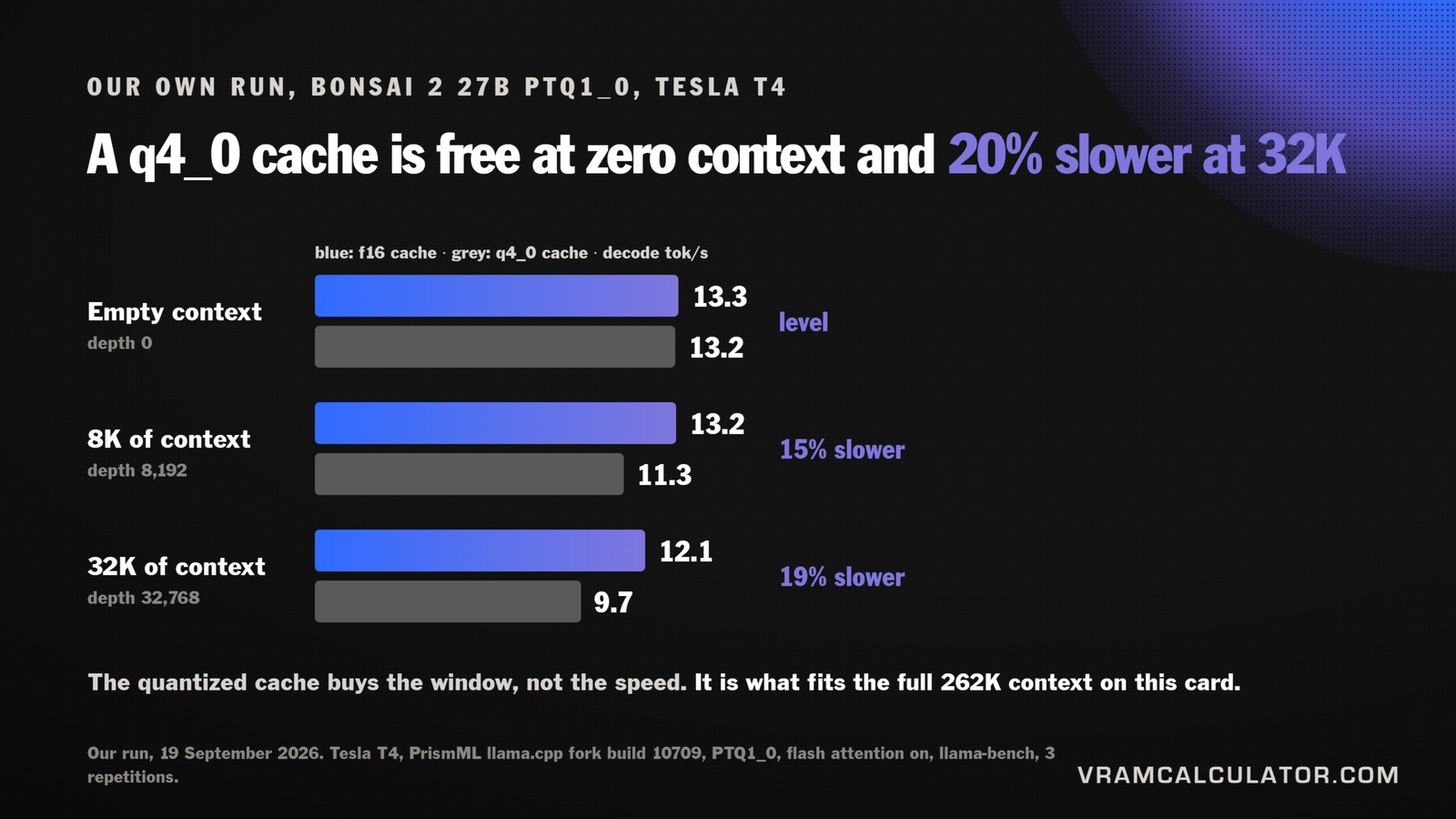
A q4_0 KV cache is the standard advice for fitting long context on a small card. On this GPU it works, and it is not free.
| File | Cache | Depth 0 | 8K | 32K |
|---|---|---|---|---|
| PTQ1_0 | f16 | 13.3 | 13.2 | 12.1 |
| PTQ1_0 | q4_0 | 13.2 | 11.3 | 9.7 |
| PQ2_0 | f16 | 11.7 | 12.6 | 11.3 |
| PQ2_0 | q4_0 | 12.4 | 11.7 | 9.0 |
Decode, tokens per second, three repetitions each. Standard deviation is under 0.4 on every cell except PTQ1_0 with a q4_0 cache at 8K, where three runs spread by 1.6, so treat that 11.3 as the softest number here.
At an empty context the quantized cache costs nothing. It is level on PTQ1_0 and slightly ahead on PQ2_0. At 32K it is about 20% slower, 12.1 against 9.7 on PTQ1_0 and 11.3 against 9.0 on PQ2_0. The cost arrives with depth, because a quantized cache is decompressed on every attention step and there is more of it to decompress the longer you talk.
What you buy is the window. On this card the full 262,144-token context needs a measured 11.4 GiB with a q4_0 cache. With an f16 one our engine puts it at 22.9 GiB, which is not a close call on a 15 GiB card, so we did not spend a session watching it fail. So the trade is real in both directions: the cache setting that makes long context possible is the one that slows the answer down once the context is actually long.
This matches what we measured on a processor in llama.cpp performance flags, where a q4_0 cache was slower on every backend that has F16C and faster only on the ones without it. Two different machines, same direction: quantize the cache to fit the context, not to go faster.
12 tok/s on a card with almost as much bandwidth as an RTX 3060
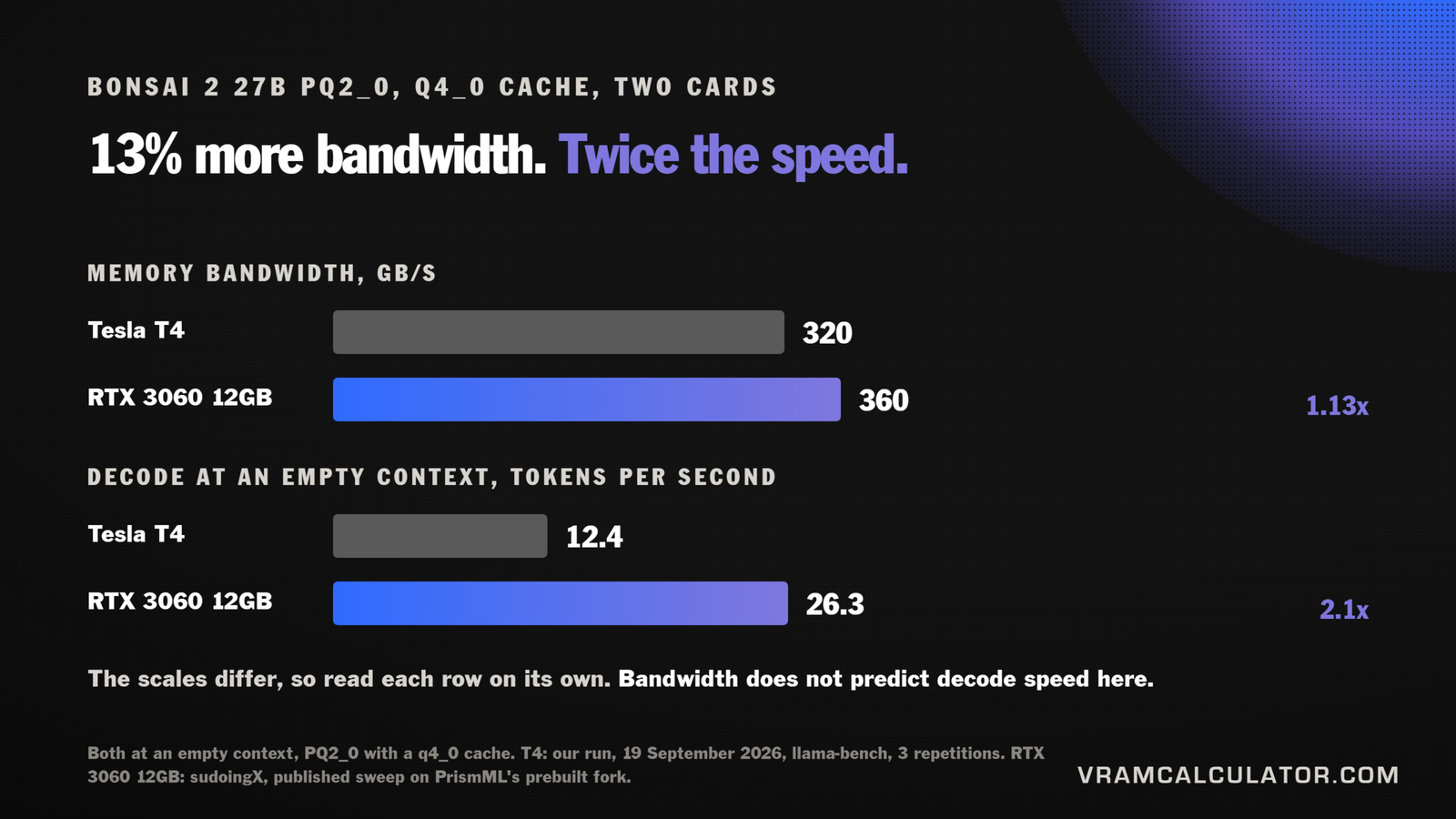
The T4 reads its memory at 320 GB/s. An RTX 3060 12GB reads at 360, about 13% more. If decoding this model were bound by memory bandwidth, the two cards would land within about 13% of each other.
They do not. On PQ2_0 with a q4_0 cache at an empty context we measured 12.4 tok/s. sudoingX published 26.3 for the same file, the same cache and the same empty context on an RTX 3060 12GB, on PrismML’s own prebuilt fork, and @DogukanUrker reports about 35 on the same card. Two to three times the speed, for 13% more bandwidth.
PrismML’s model card does say batch-1 decode with these kernels is limited by instruction throughput rather than bandwidth, but it says so about the H100, the A100 and the Blackwell cards, and it puts the Ada parts and the L4 in the other camp, where memory binds instead. Our T4 sits with that second group on the card’s own test, because the smaller file decodes faster here. So the explanation is not ours to borrow, and the useful part is narrower.
The practical version: for this model, do not pick a card by its bandwidth. The usual arithmetic, weights divided by bandwidth, is what our own speed checker uses, and it is why that tool refuses to estimate Bonsai 2 at all and shows measured runs instead.
The two files trade prefill against decode
PTQ1_0 is the smaller file at 5.95 GB. PQ2_0 is 7.21 GB. The larger one is faster at reading your prompt and slower at writing the answer.
| File | Prefill, depth 0 | Prefill at 32K | Decode, depth 0 | Decode at 32K |
|---|---|---|---|---|
| PTQ1_0 | 186 | 142 | 13.3 | 12.1 |
| PQ2_0 | 272 | 193 | 11.7 | 11.3 |
Tokens per second, f16 cache.
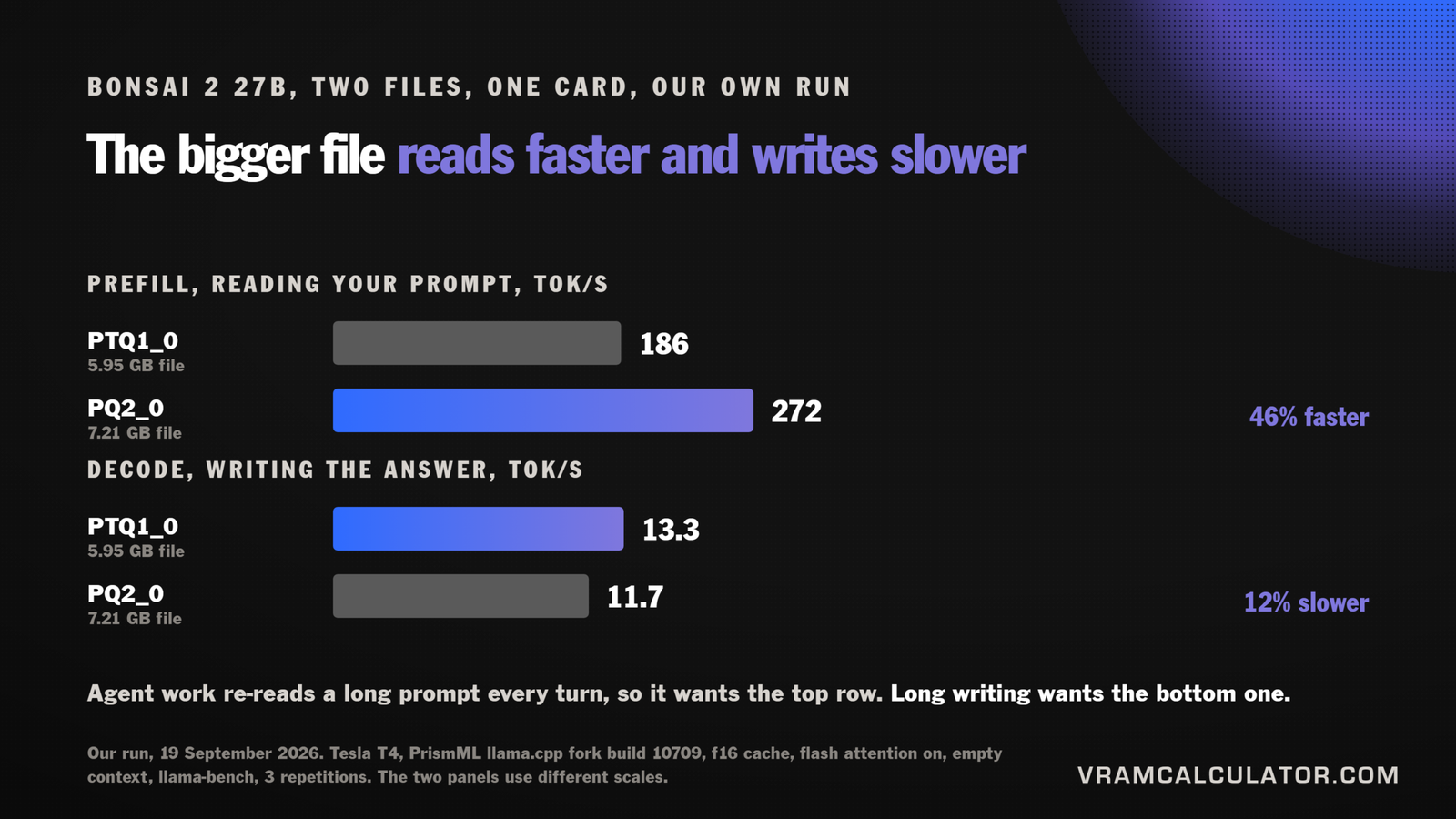
PQ2_0 reads a prompt about 46% faster at an empty context and writes about 12% slower. If your work is agentic, where a long prompt is re-read on every turn and the reply is short, that trade favours PQ2_0. If you are generating long text, PTQ1_0 wins. @DogukanUrker’s summary from his own 3060 runs points the same way: take PTQ1_0 for context, PQ2_0 for speed.
What it means for the calculator
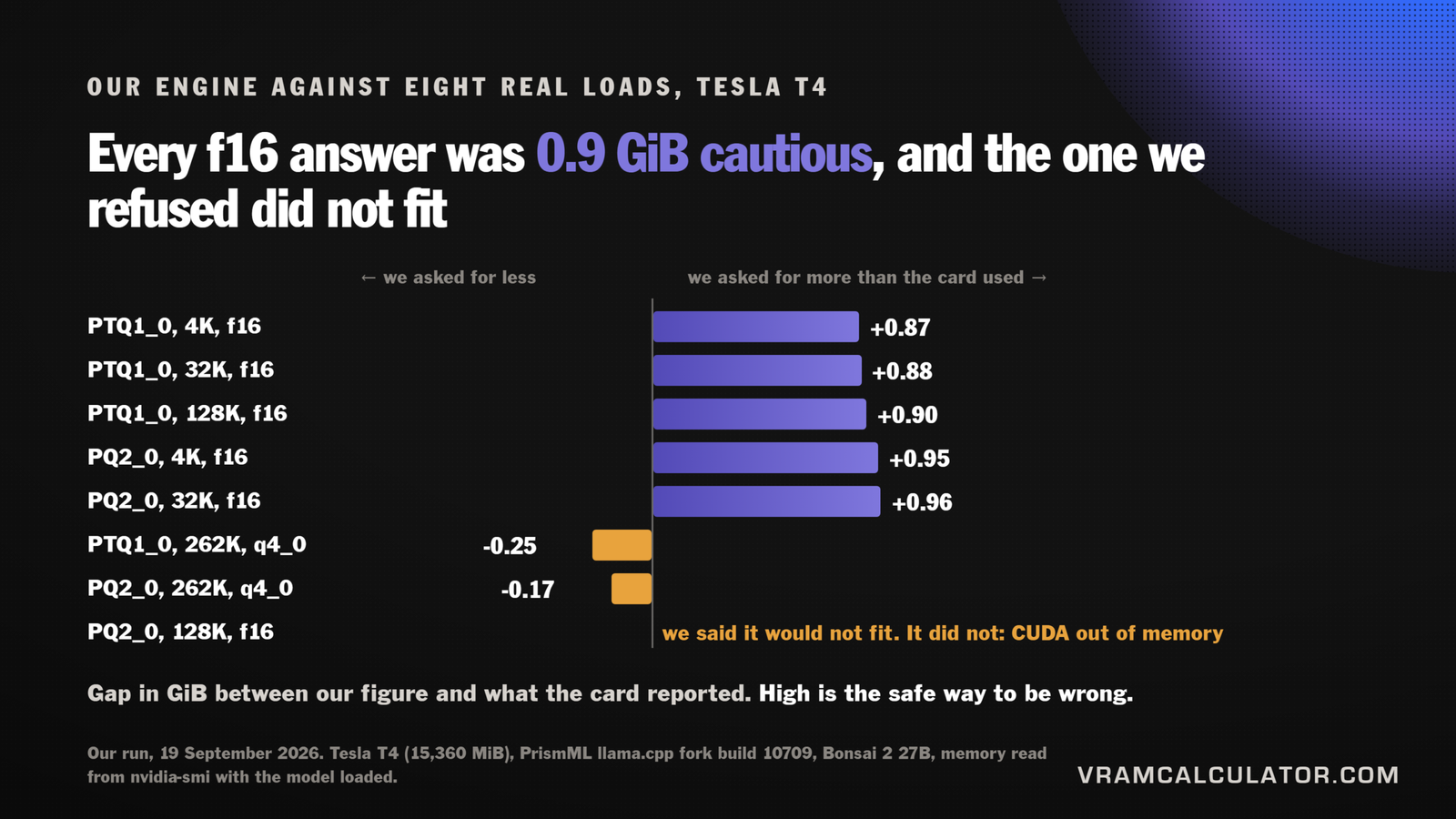
Our engine’s memory figures for this model went up with the launch article on Bonsai 2 27B VRAM requirements. This run put them against a real card.
| File | Context | Cache | Our figure | Measured | Gap |
|---|---|---|---|---|---|
| PTQ1_0 | 4K | f16 | 6.81 GiB | 5.94 GiB | +0.87 |
| PTQ1_0 | 32K | f16 | 8.59 GiB | 7.72 GiB | +0.87 |
| PTQ1_0 | 128K | f16 | 14.71 GiB | 13.81 GiB | +0.90 |
| PTQ1_0 | 262K | q4_0 | 11.14 GiB | 11.39 GiB | -0.25 |
| PQ2_0 | 4K | f16 | 8.01 GiB | 7.06 GiB | +0.95 |
| PQ2_0 | 32K | f16 | 9.79 GiB | 8.83 GiB | +0.96 |
| PQ2_0 | 128K | f16 | 15.91 GiB | did not fit | matches |
| PQ2_0 | 262K | q4_0 | 12.34 GiB | 12.51 GiB | -0.17 |
Measured is what nvidia-smi reported with the model loaded and a short generation done.
On every f16 load we asked for more than the card used, and the amount barely moved: five loads, two files, a context range of 32 times, and the gap sits between 0.87 and 0.96 GiB. That is a constant, not a drift. It is the llama.cpp allowance our engine applies, and it is the safe direction to be wrong in, because a reader who follows it has a spare gigabyte rather than a failed load.
At the full window with a quantized cache we are low instead, by 2.2% on PTQ1_0 and 1.4% on PQ2_0, the only two rows where a reader could be told something fits with less room than they expect. Strip the allowance out and the reason shows: at f16 the real overhead is close to nothing at every context we measured, and at 262K it is about a gigabyte on both files. It scales with the window, and our flat allowance does not. That is now an open decision, and the runs that would settle it are listed against it.
The PQ2_0 row at 128K is the one we care about most. Our engine said 15.91 GiB, which does not fit this card, and the card agreed: the server printed a CUDA out of memory and stopped. A prediction that says no and is right is worth more than one that says yes.
The 16 GB card that holds 15
The run found something our catalogue had wrong, and it is not specific to this model.
A Tesla T4 is sold as 16 GB. It reports 15,360 MiB. The missing 1,024 MiB is exactly 6.25%, and the reason is ECC: on a GDDR card the error-correction bits live in the same memory they protect, so the card gives a sixteenth of itself to keep the rest honest. NVIDIA’s own documentation gives the adjustment as one sixteenth for any GPU without HBM2 memory.
That means:
- GDDR datacenter cards give up a sixteenth when ECC is on, which is their default: T4, L4, L40, L40S, A10, A40, P40. We measured the T4. The rest follow NVIDIA’s own adjustment, and a driver reserve can take a little more on top: a P40 reports 22,912 MiB against a 24,576 label.
- Stacked-memory cards lose nothing. A100, H100, H200, V100, A30 and P100 carry dedicated ECC storage in the memory stack, which NVIDIA’s Pascal tuning guide calls overhead-free ECC protection, and NVIDIA’s vGPU adjustment drops to zero on that class.
- Consumer cards lose nothing, because they have no ECC. A 3060 reports its full 12 GB. Workstation cards such as the RTX 6000 Ada do have it, switched off from the factory, so they report full until you turn it on.
- You can switch it off with
nvidia-smi -e 0and a reboot, on cards that allow it, and get the memory back.
Our calculator now takes that sixteenth off those cards before it answers, so a T4 is sized as the 15 GiB it is. If you rent GPUs by the hour, this is worth knowing before you plan a fit down to the last gigabyte.
FAQ
Can a Tesla T4 run a 27B model?
Yes, if the file is small enough. Ternary Bonsai 2 27B at PTQ1_0 is 5.95 GB and leaves room for 128K of context on a T4. Decode came to about 13 tok/s at short context and 12 at 32K. An ordinary 4-bit 27B is 16.5 GB, which is more than this card reports.
Does a q4_0 KV cache make a model faster?
Not on this card. It was about 20% slower at 32K of context than an f16 cache, on both files. What it buys is room: the full 262K window fits in 11.4 GiB with a quantized cache and does not fit at all without one.
How much VRAM does a Tesla T4 actually have?
It reports 15,360 MiB, not 16 GB, because ECC takes one sixteenth of a GDDR card’s memory. The same applies to the L4, L40S, A10, A40 and P40. HBM cards such as the A100 and H100 keep their full capacity.
Is the T4 a good card for local LLMs?
For memory, it is a cheap 15 GiB. For speed on this model it decoded at 12.4 tok/s on PQ2_0 with a q4_0 cache at an empty context, against 26.3 published for an RTX 3060 on the same file and settings, a card with 13% more bandwidth. Bandwidth does not predict decode speed on this model, so check measured runs for your model in our tokens per second tool before choosing one.
What hardware were these numbers taken on?
Tesla T4, 15,360 MiB, driver 580.82.07, PrismML’s llama.cpp fork build 10709, commit 9a9394a89, prebuilt Linux CUDA 12.4 binary. Files: Ternary-Bonsai-2-27B-PTQ1_0.gguf at 5,946,648,928 bytes and Ternary-Bonsai-2-27B-PQ2_0.gguf at 7,206,168,928 bytes, both from PrismML’s Hugging Face repository.