Agents got their own computers this autumn
Between September and October, the agents everyone was talking about got a computer of their own.
Meta went first. On 8 September 2026 it introduced Muse, a personal agent powered by its Muse Spark model, which Meta says runs in its own "dedicated, secure computer with its own browser", a machine it calls Muse Secure VM (TechCrunch). Muse is free to start, with Power at $20/month and Maximum at $100/month.
OpenAI followed on 29 September with dots for ChatGPT Pro and Business Premium. In OpenAI's words, "Each dot works on its own cloud computer, while your computer and its contents stay separate unless you choose to connect it." Dots launched on GPT-6 Astra, and an update on 3 November 2026 widened the family behind them to include GPT-6.1 Terra.
Then came GrokBot. Alice Moore's review for Builder.io (15 October 2026) describes the shape: "Each bot is an agent with its own chat and its own little Linux computer in the cloud." With GrokBot orchestrating her coding agents she merged 78 pull requests in a week, against a previous best of 35. Over the following weekend, while she slept, her 16 bots burned $100, on what she had already upgraded to the $200 plan. Her verdict: "GrokBot is amazing. It gave me a real week of what an always-on staff can do, and I want the version that lasts." The review's title finishes the thought: "Here's why I stopped using it."
Every one of these agents lives on somebody else's computer, runs somebody else's model and bills by the hour of attention. For readers of this site, the obvious question was when someone would ship the same idea for the machine under the desk.
n8n answered it, and that is a comeback
n8n was the workflow tool many self-hosters already ran. Then agent harnesses arrived and the question changed. On 16 February 2026 a verified n8n creator opened a thread on n8n's own forum titled "Is n8n Dead Or Just Facing Higher Expectations", and answered in the first line: "far from dead, but expectations are evolving."
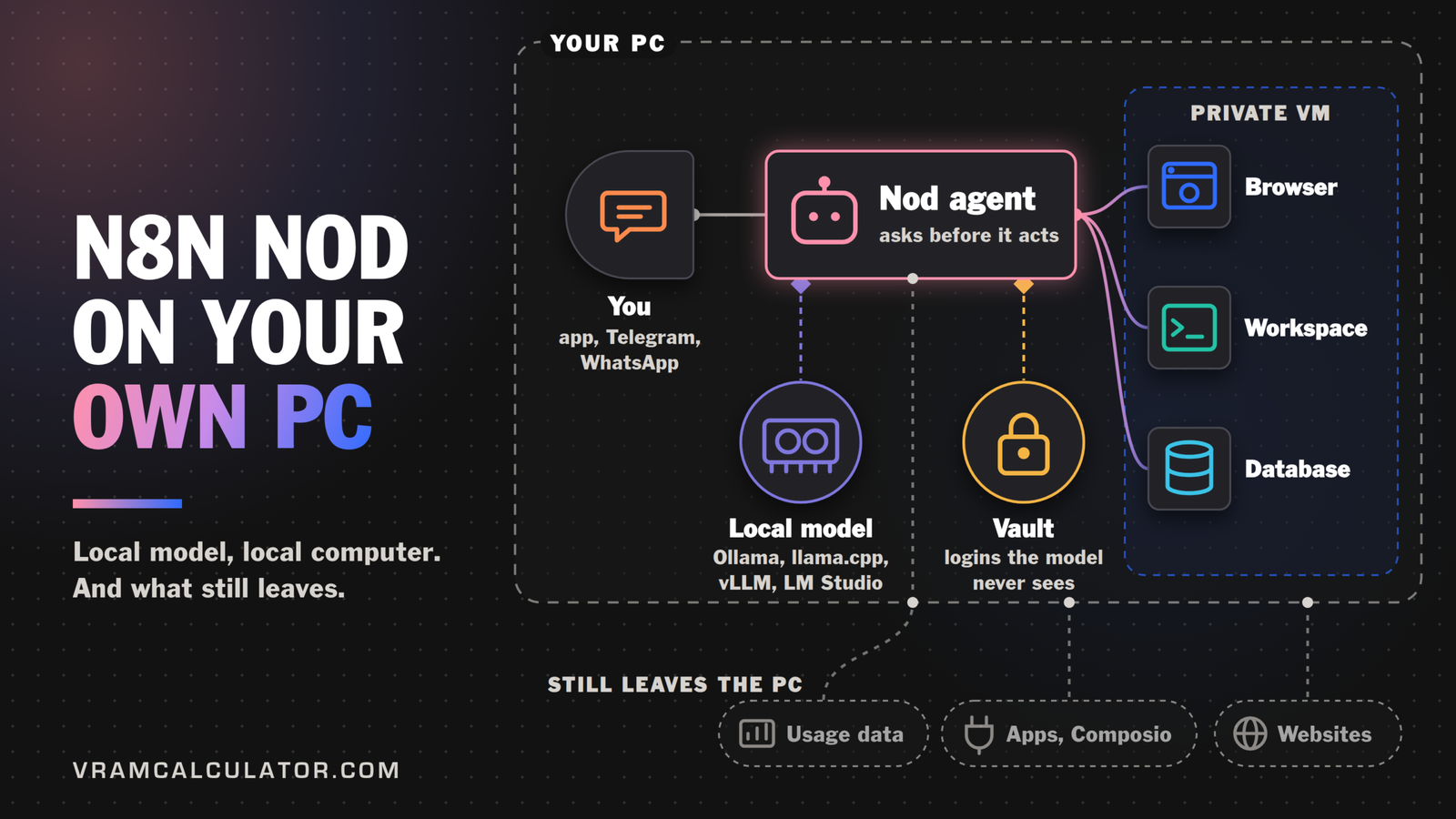
On 10 November 2026, n8n Labs released Nod. The repository describes it in one line: "Open source personal agent with its own computer." It is the same idea as Muse, dots and GrokBot, with two differences that matter here. The computer is a private virtual machine on your own PC. The model can be one you run yourself, through Ollama, LM Studio, vLLM or llama.cpp.
Nod is free under Apache 2.0, a standalone app that needs no n8n account, and a research preview. As of 17 November 2026 the release list held 15 releases, from nod-v0.6.0 on 9 November to nod-v0.8.4 on 17 November. The pace is part of the story.
What Nod actually is
Inside the virtual machine, n8n's architecture docs describe one Node process plus Docker containers for a Linux workspace, a Chromium browser and a PostgreSQL database. The agent works in its own browser, keeps its memory in its own database and runs commands in its own workspace, separate from your files. You talk to it in the app, on Telegram or on WhatsApp.
It is built for errands with logins and forms: the README's own list includes chasing invoices, prepping calls and cancelling trials on real websites. Two design choices stand out for a homelab owner.
- It asks before it acts. Before Nod sends, pays, posts or deletes something you did not ask for, a separate check confirms you asked for it.
- The model never sees your passwords. The Vault "enters passwords, codes, and cards privately on the website" (README), and model keys never enter a prompt, the workspace or the browser (n8n's privacy page).
Three ways to run it at home
One box for everything
The desktop app is the quickest start. It sets up its private computer for you, and the model server can run on the same machine.
Nod desktop app, from n8n's install docs, 17 November 2026
| System | Requirement for a local assistant | Download (n8n's figure) |
|---|---|---|
| Mac | macOS 14 or later, Apple silicon or Intel | about 1.8 GB |
| Windows | Windows 11 x64, WSL 2 with hardware virtualization, at least 20 GB free disk | about 2.1 GB |
| Linux | x64 Flatpak preview, hardware virtualization and access to /dev/kvm |
not stated |
This is the right shape for a gaming PC with a 24 GB card, or a Mac with plenty of unified memory. The catch is the one the README states plainly: schedules run only while the computer running Nod is on.
The homelab split: an old server for Nod, a GPU box for the model
This is the setup most of our readers will want, and n8n's self-hosting docs make it easy. The Nod server is light: "Linux AMD64 or ARM64, or a Mac with Docker Desktop. Start with two CPU cores, 8 GB of memory, and 50 GB of disk." It needs Docker Engine 25 or newer with Compose v2, and you reach it through an SSH tunnel or a domain on ports 80 and 443. That describes the retired office PC or the old Xeon in the cupboard. It stays on all night and draws little, which solves the laptop-sleeps problem.
The GPU box serves the model and nothing else. The one trap is the address. n8n's local models page warns that "The model server must be reachable from Nod's server. On a remote install, localhost refers to that server; inside Docker, it refers to Nod's container." So the http://localhost:8080/v1 from the docs becomes your GPU box's LAN address, with the model server listening on the network rather than only on loopback.
The split has a second benefit. The server docs add that "simultaneous browser tasks and local models need more capacity". Keeping the model off the Nod server means the small box only has to run the VM, and the GPU box keeps its whole memory for weights and cache.
A power user, or a small team
"One server belongs to one person", per the self-hosting docs, and each installation has one owner. A household or a small team therefore runs one Nod server per person. All of them can point at the same GPU box, which turns one good card into the shared brain for several agents. If they work at the same time, the model server queues or batches their requests, so size the card with some room for the extra cache.
Which model, on which card
Nod puts two requirements on a local model: it must support tool calls, and it needs "At least 64,000 tokens of context". Nod's own instructions and tools take about 20,000 tokens before your first message. That window is what decides the card, because the cache grows with it.
We ran the homelab ladder through our calculator at a 65,536-token window with llama.cpp. On a discrete card llama.cpp keeps the token embedding in system RAM by default, and our calculator counts it there. The need adds the margin each card keeps for itself: 1.3 GB on a gaming card, 0.5 GB on a mining card. Every model link opens the calculator with the settings filled in.
The homelab ladder at Nod's 65,536-token window, our calculator, 17 November 2026
| Your hardware | What to run | Need, our calculator |
|---|---|---|
| RTX 3060 12 GB | Gemma 4 26B MoE, Q2_K | 11.1 GB of 12 |
| RTX 4060 Ti or 5060 Ti 16 GB | Gemma 4 26B MoE, Q3_K_M, or Qwen 3.8 27B at Q2_K (14.7 GB) | 13.4 GB of 16 |
| A used RTX 3090, 24 GB | Qwen 3.8 27B, Q4_K_M; Q5_K_M also fits at 23.7 GB | 20.7 GB of 24 |
| RTX 5090, 32 GB | Qwen 3.8 27B, Q8_0 with a q8_0 cache | 30.4 GB of 32 |
| CMP 170HX, unlocked to 64 GB | Qwen 3.8 27B, Q8_0; the full FP16 model fits too, at 54.4 GB | 31.3 GB of 64 |
| Mac with 128 GB | Qwen 3.8 27B at Q8_0, the comfortable pick | 31.9 GB of 83 to 96 GB usable |
| DGX Spark | Qwen 3.8 Flash Next, Q4_K_M, 107.6 GB | 112 to 119 GB usable |
The 12 and 16 GB rungs run on 2-bit and 3-bit files, the lowest rungs the calculator offers. They work, and they are also where the safety check below gets weakest. A Mac and a Spark share one pool between system and GPU, so nothing is held off the card there and the full total counts. On a 128 GB Mac, Qwen 3.8 Flash Next at Q3_K_M needs 87.5 GB, inside that 83 to 96 GB range rather than under it. It fits only if your Mac lets the GPU use the upper part of the range, which our Mac checker marks as "depends on your Mac's real limit". Our Mac checker answers for every Apple silicon machine, and What LLM can I run runs the whole catalogue against any card.
The mining card rung
The CMP 170HX is our favourite oddity. It is a crypto-mining card that, once unlocked, holds 64 GB of HBM2e, and we covered the unlock and what it changes. For Nod it means the Q8_0 build of Qwen 3.8 27B with more than half the card to spare, or the whole unquantized model. One tester, @shiwuxiu, measured Qwen 3.8 27B at Q4_K_M on an unlocked card with llama.cpp: 33.0 tok/s writing, and 46.7 with the model's MTP drafting. That run used short prompts, so it says nothing yet about speed at Nod's 65,536-token window.
Flash Next without a 96 GB card: Strata
Qwen 3.8 Flash Next is the model homelab owners want in an agent, and it does not fit any single gaming card. Strata is an open-source engine built for exactly this: it keeps the model's experts in system RAM and runs them through a consumer GPU. Strata 0.2.15's own docs list an OpenAI Chat Completions endpoint at http://127.0.0.1:8080/v1, a --access lan option that serves it to your network, and a strata connect --check command that sends a prompt and a tool call to confirm they work. That is the interface Nod's OpenAI-compatible connection expects. Strata's docs do not list Nod among the apps they have tested, and we have not run the pair, so treat it as a combination to try.
The numbers testers have posted are the reason to try it:
- RTX 5090 with 121 GB of system RAM, Strata 0.2.10: 227.1 tok/s chat decode and 250.3 in an agent test, with system RAM peaking at 77.4 GB (@lyesbahi, 3 November 2026).
- Strix Halo, 128 GB unified (GMKtec EVO-X2, Ryzen AI Max+ 395), Strata 0.2.12: Flash Next UD-IQ4_XS-v31 read a 32K prompt at 876.8 tok/s with its tuning variables set, 562.6 without (@BrofessorSpez, 8 November 2026).
Our Strata calculator checks whether your card and RAM hold it, and our Strata and Flash Next article covers the engine in depth.
What testers measured on Qwen 3.8 27B. Speed matters more for an agent than for a chat, because every step of a task is another model call.
- One RTX 3090: about 700 tok/s reading and 40 tok/s writing with llama.cpp, averaged over extended use, quant and window not stated (@ItsmeAjayKV). Open it in the speed tool.
- One RTX 5090: 61 tok/s plain decode, and 109 to 145 with the model's MTP head (@witcheer). Open it in the speed tool.
- Our own run on an NVIDIA L4: at a 65,536-token window with llama.cpp we measured 482.5 tok/s reading and 11.86 tok/s writing at full depth, peak 18.90 GiB (4 October 2026).
Reading speed is the number to watch. Nod's 20,000-token preamble takes about 41 seconds to read at our L4's 482.5 tok/s, and about 29 seconds at 700 tok/s on a 3090. A faster card shortens every task that starts from a cold prompt.
Our pick. Run the largest 27B-class quant your card holds. A used 3090 with Qwen 3.8 27B at Q4_K_M is the homelab sweet spot. A 5090 or an unlocked CMP 170HX buys the Q8_0 build. For Flash Next, pair a gaming GPU with 128 GB of RAM through Strata, or buy a Spark. Bigger is also safer here, for a reason specific to Nod.
The model you pick also runs the safety check
By default Nod's trust check uses your local model at its lowest reasoning setting (NOD_TRUST_MODEL=selected), and n8n warns that smaller models decide less reliably. n8n's README claims a gap between cloud models: "In 240 test decisions, GPT-6.1 Sol and Claude Opus 5.5 got every one right. Claude Haiku 5.5 let 8 unsafe actions through." That is n8n's own claim, and its benchmarks page does not describe the test. Nobody has published the same test for local models yet, and we have not run Nod. The practical reading: pick the largest tool-calling model your card holds at 65,536 tokens.
Setting up the model server
Every engine needs the window raised from its default. n8n's local models page gives the commands.
How each engine is started, per n8n's local models page, 17 November 2026
| Engine | What the docs set | Address on the same machine |
|---|---|---|
| Ollama | OLLAMA_CONTEXT_LENGTH=65536 ollama serve |
http://localhost:11434/v1 |
| LM Studio | Context Length 65,536 or more, then lms server start |
http://localhost:1234/v1 |
| vLLM | --max-model-len 65536 --enable-auto-tool-choice --tool-call-parser <parser> |
http://localhost:8000/v1 |
| llama.cpp | llama-server -m <model>.gguf -c 65536 --jinja |
http://localhost:8080/v1 |
In Nod, the connection is OpenAI-compatible; during onboarding it sits under More providers, then Your own server. If the window is too small, the docs list the symptom: Nod "ignores your request, forgets its tools or repeats itself." Most servers start at 4,096 tokens, and some cut Nod's instructions off without an error.
A few things change on a local model, per the same page. Usage shows "No price" and does not count toward the spending limit. Only Ollama and LM Studio vision models receive screenshots, and only Ollama offers thinking levels. There is no 90-second timeout for a server you run, "because local models can take minutes to start answering."
What still leaves your PC
With a local model, your database, files, memory and saved logins stay on the machine running Nod. A few things still go out, and n8n's privacy page lists them:
| What | Where it goes | Default |
|---|---|---|
| Usage data: screens, features, task types, timings; not your messages or Nod's replies | n8n (PostHog, EU) | On; switch it off in Settings → Privacy & data |
| App connections such as Gmail or Slack | Composio, through a service n8n hosts, with Zero Data Retention | When you connect an app |
| Web searches | Exa | When Nod searches |
| Desktop update checks | n8n | On |
| Websites Nod works on | The websites | By design |
For a fully local setup, switch off usage data, keep the trust check on your local model, and connect apps only if you accept the Composio route. The agent still has to visit websites to do errands. The reasoning, the browser session, the memory and the logins stay home.
What Nod does not do yet
- No hosted version yet. On a laptop it stops when the laptop sleeps. The homelab split above is the fix today, and managed hosting is next on n8n's list.
- One owner per installation, so a team runs one server per person.
- Research preview. n8n's own headline benchmark (98% of 226 errands, 0 unsafe actions in 678 runs) was measured on GPT-6.1 Sol on 17 October 2026 in simulated accounts; n8n notes the 98% is rounded and the suite has since grown.
Sources
- TechCrunch, "Meta debuts its Muse AI agent. Will consumers trust it?", 8 September 2026. https://techcrunch.com/2026/09/08/meta-debuts-its-muse-ai-agent-will-consumers-trust-it/
- OpenAI, "Introducing dots", 29 September 2026, updated 3 November 2026. https://openai.com/index/introducing-dots
- Alice Moore, "GrokBot is amazing. Here's why I stopped using it.", Builder.io, 15 October 2026. https://www.builder.io/blog/grokbot-review
- n8n community forum, "Is n8n Dead Or Just Facing Higher Expectations", 16 February 2026. https://community.n8n.io/t/is-n8n-dead-or-just-facing-higher-expectations/265542
- n8n, "Meet Nod: a standalone personal agent from n8n Labs that runs on your computer", Ophir Prusak, 10 November 2026. https://blog.n8n.io/meet-nod/
- n8n, Nod repository, README and releases. https://github.com/n8n-io/nod
- n8n, Nod docs: Local models, Models, Install the desktop app, Self-host, Your data and privacy, Architecture, Benchmarks. https://nod.n8n.io/docs/
- VRAMCalculator, calculator engine and speed table, 17 November 2026. Tester runs credited by handle above.
FAQ
Is n8n Nod a local alternative to OpenAI dots?
It is the closest thing so far. Dots give an agent its own cloud computer on OpenAI's models. Nod gives an agent its own private virtual machine on your PC, driven by a model you choose, which can run on your own GPU through Ollama, LM Studio, vLLM or llama.cpp.
Is Nod like GrokBot?
The shape is similar: an agent with its own computer and browser that runs jobs on a schedule. GrokBot's computer is a Linux machine in the cloud, per Alice Moore's review. Nod's runs on your hardware.
What GPU do I need for n8n Nod with a local model?
The model sets it, at Nod's 64,000-token minimum. Our calculator puts Qwen 3.8 27B at Q4_K_M at 20.7 GB at a 65,536-token window, which fits a used RTX 3090. A 16 GB card runs Gemma 4 26B MoE at Q3_K_M (13.4 GB). For Qwen 3.8 Flash Next, use Strata with a gaming GPU and plenty of system RAM, or a DGX Spark.
Can Nod and the model run on different machines?
Yes. Run the Nod server on any Linux box with two cores and 8 GB of memory, and point it at the GPU machine's LAN address instead of localhost. n8n's docs warn that localhost means the Nod server itself on a remote install.
Is n8n Nod free?
Yes. It is open source under Apache 2.0, and with a local model n8n's install docs say a request costs nothing.
Do I need n8n to use Nod?
No. Nod is a standalone app and needs no n8n account. If you run n8n, you can connect it so Nod can work with your workflows.