What Project Maya is
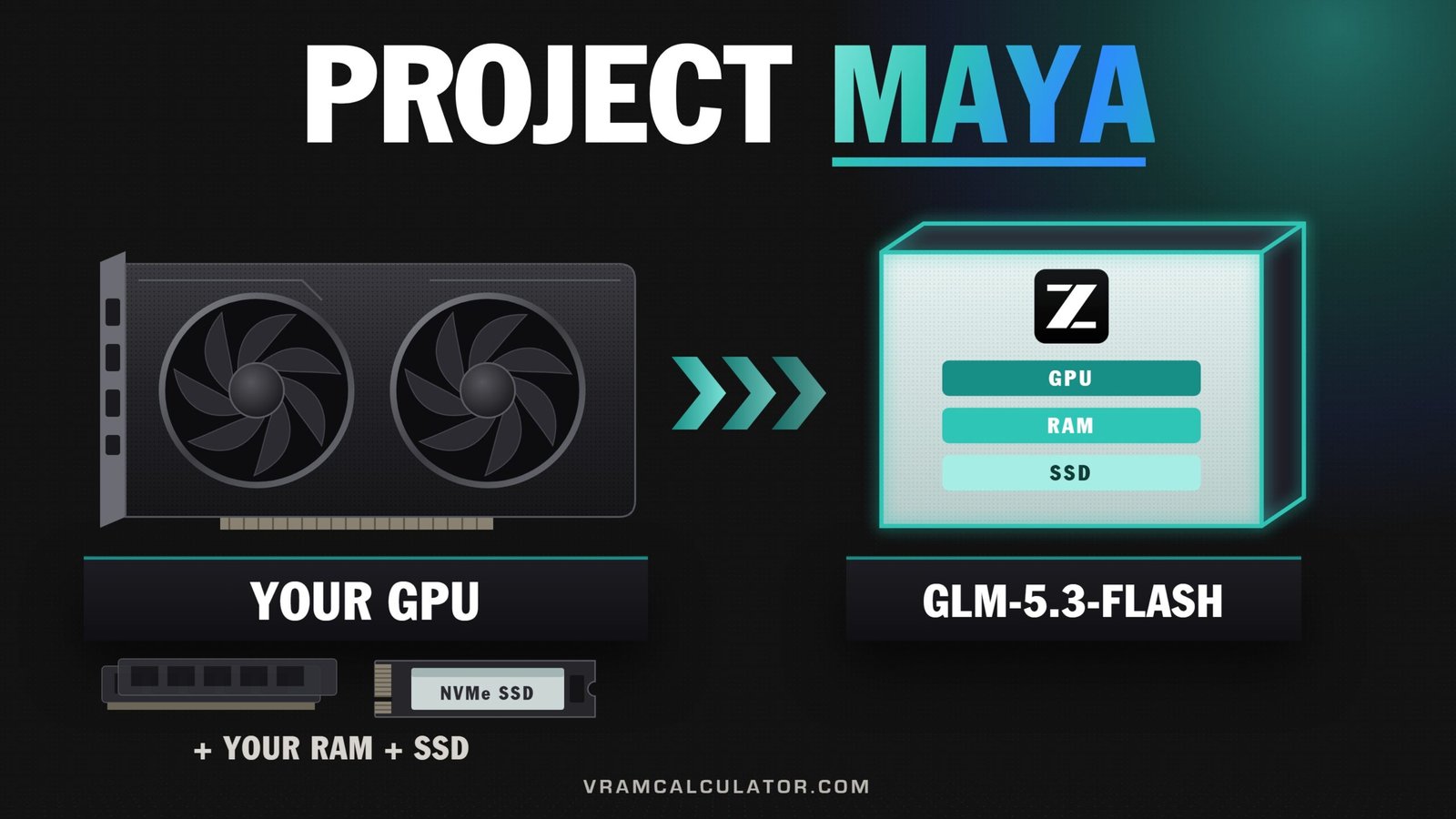
Project Maya runs GLM 5.3 Flash, Z.ai's 320B model, on NVIDIA cards with as little as 32 GB of system RAM: its author's two Tesla V100s, with 30 GB of RAM, write at up to 40 tok/s. It keeps the experts the model uses most on the cards, the next ones in RAM and the rest on an NVMe SSD, and moves them as the conversation needs them. The project is open source under the MIT licence and comes from the developer who publishes it as PeasantSmith (GitHub mw00). To check your own card, RAM and context against each build, use our Maya calculator.
Its author ran Strata first. Our Strata page lists @PeasantSmith among the Tesla V100 owners running Strata, on a 32 GB card at 256K of context, and the same X account links to the Hugging Face page that publishes Maya's builds. Strata is Niko Veit's MIT-licensed engine that runs Qwen 3.8 Flash Next the same way. Maya's README says its engine started from Strata's and was rewritten for GLM 5.3 Flash: the expert tiers across VRAM, RAM and SSD, the split across two cards, and the model's own MTP decoding. Its server and dashboard began as Strata's too, and were reworked for Maya.
The pace beats Strata's first week. Strata had 19 releases four days after its first on 24 September; Maya went from 1.0.0 on 7 October to 1.0.23 on 9 October, reached 1.0.30 on 10 October, 1.1.0 on 12 October, 1.1.11 on 14 October, the fourth release that day, and 1.1.15 on 16 October. By then its issue tracker held speed reports and code from owners of RTX 3090s, two RTX 5090s, a modified RTX 4090 D 48GB, four Tesla T4s, two NVIDIA CMP 170HX mining cards and four RTX 4090s.
Why GLM 5.3 Flash is the bigger story
GLM 5.3 Flash is Z.ai's mixture-of-experts model: 320B parameters by Z.ai's count (321.3B in the published checkpoint), about 18B of them working on each token, and a context of up to 1M tokens. Z.ai's model card says it approaches Claude Opus 4.8 on coding and agentic benchmarks.
Our GLM 5.3 Flash VRAM page sizes it for cards that hold it whole, and covers @0xSero's exllamav3 route on one RTX 3090. Maya is the other route for everyone else: one installer and its own quants. Our VRAM calculator has GLM 5.3 Flash, so you can see how far it is from fitting your card whole.
How does it compare with Qwen 3.8 Flash Next, the model Strata runs? @WescheNex1q ran both on two DGX Sparks through their Spark-Bench suite (version 7.0, 80 scenarios, two repeats, thinking off). GLM 5.3 Flash, as a 4-bit EXL3 build on TensorFold 0.6.0 with patches, scored a TrueScore of 84.8. Qwen 3.8 Flash Next in NVFP4 scored 79.4 on vLLM and 77.9 on TensorFold's Zig engine. The tester calls the rows deployments, not models, and on their previous version (6.8.0, not comparable) Flash Next had come out ahead, 87.02 to 85.67. The widest gap was long context, 70.8 against 21.6 to 27.9, where GLM found the planted fact on the hard needle test and Qwen missed it on both engines. Their summary: Qwen follows instructions and formats more precisely, GLM codes, builds and retrieves better.
The price of GLM's lead in that bench is speed. Each token reads about 18B parameters against Flash Next's 6B, three times as many, so on the same machine expect GLM 5.3 Flash to write more slowly. That is arithmetic on the two model cards; the speeds below are Maya's own.
The builds
Maya does not use a generic GGUF by default. It installs its own quant, made from Z.ai's FP8 release with statistics from the FP8 model itself, and it keeps the model's MTP block, which drafts tokens ahead on two cards or more. From the author's own tests, in the README:
| Build | Size | Made for | Keeps of the FP8 model's zero-shot accuracy | Same next token as FP8 |
|---|---|---|---|---|
Maya-S (the default; Maya-S-v2-IQ2_XXS in the setup) |
96.5 GB | a smaller memory pool across RAM and VRAM | 97.9% | 83% |
| Maya-S24 | 94.7 GB | cards of 24 GB or less | 97.7% | 83% |
| Maya-M | 116 GB | a bigger pool | 97.9% | 86% |
| Maya-L | 156.3 GB | the biggest pool | 99.2% | 90% |
Maya-S24 keeps Maya-S's 2-bit routed experts and moves only the attention and shared experts, the small part every token runs through, from 6-bit to 4-bit. That leaves about 1.5 GB more of a 24 GB card for experts: on one Tesla V100 limited to 24 GB, the author measured 13.5 tok/s against Maya-S's 11.8. The zero-shot scores come from five tasks of 400 questions each (ARC-Easy, ARC-Challenge, HellaSwag, WinoGrande, PIQA), the same questions for each build and for the FP8 model.
The setup lists the default under the longer name Maya-S-v2-IQ2_XXS and describes it as error-feedback-rounded IQ2_XXS gate/up experts; the README calls the same build Maya-S. We checked the file list in v1.1.15's setup against our own: three files, 96,468,592,256 bytes, the same as the build we have always counted. Nothing about its size changed.
Maya also offers Maya-M-Derisked, a 116 GB experimental edit of Maya-M by Blackfrost_AI. Its quality against the FP8 model has not been measured, so the four accuracy figures above do not cover it.
Since 1.1.0 the setup can also download turboderp's EXL3 quant at 3.05 bits per weight, and since 1.1.9 the one at 4.05 bits, both experimental and NVIDIA only. The scores above cover Maya's own four builds; the EXL3 quants' sizes and runs are in the sections below.
How fast it runs
The author's own figures, with Maya-S:
| Machine | Writing | Reading a prompt |
|---|---|---|
| 2x Tesla V100 32 GB (PCIe 3), Xeon E5-2690 v4, 30 GB RAM, one NVMe | up to 40 tok/s | up to 670 tok/s |
| 1x Tesla V100 32 GB (PCIe 3), Core i5-12600T, 64 GB RAM, one NVMe | up to 19 tok/s | up to 620 tok/s |
"Up to" matters here. The first answers after a start are the slowest, while the expert caches fill with the experts your conversations use, and the MTP drafting that helps the two-card machine needs two GPUs or more.
Owners have filed their own numbers on the project's GitHub, each with their setup. These are owner-reported, one machine each, not reproduced by us:
| Who | Machine | Build | Writing | Reading a prompt |
|---|---|---|---|---|
| @ZackO2o | 2x NVIDIA CMP 170HX 64 GB (PCIe Gen2 x4 each), 2x Xeon E5-2690 v4, 91 GB RAM, every expert in VRAM | Maya-M | 61.3 tok/s, mean of 3 | 514 tok/s at 8K |
| @0xPreDa | 4x RTX 4090, 62 GB RAM with the RAM tier capped at 40 GB, 131,072 of context, v1.0.31 | Maya-S24 | 118 tok/s, mean of 3 greedy 256-token answers; the log puts 280 to 288 slots a layer in VRAM | 4,129 tok/s at 8K |
| @vjsyong | 2x RTX 5880 Ada 45 GB, 393 GB RAM, 256K context, a KVM virtual machine, v1.1.4 | Maya-L | 54.5 tok/s with --bench, mean of 3 greedy 256-token answers (47.1 in a later live-server run); 88% of the routed experts in VRAM |
1,401 tok/s at 8K |
| @fuad00 | 2x RTX 4090 (one on PCIe 3.0), 188 GB RAM, 131,072 of context, v1.1.0 | Maya-S24 | 40.5 tok/s; 80% of the routed experts in VRAM | 1,271 tok/s |
| @briepala | 1x and 2x RTX 3090, each capped at 225 W, 126 GB RAM, 131,072 of context, v1.1.2 | Maya-S24 | 26.0 tok/s on one card, 53.0 on two (mean of 3 greedy 256-token answers) | 913 on one card, 885 on two |
| @erikash | RTX 3090, then with an RTX 3060 added; EPYC 7702P, 141 GB RAM visible in a Proxmox VM, 131,072 of context, 8-bit KV cache, after --calibrate, v1.1.4 |
Maya-M | 27.0 tok/s on the 3090 alone, 33.7 with the 3060; 28.4 on the single card with the CPU lane set by hand to 56 | 1,069 on one card, 682 on two |
| @areslp | 4x Tesla V100 32 GB, a 100 GiB RAM limit, 32K of context, v1.1.3 | Maya-L | 48.3 tok/s after --calibrate; in their controlled comparison 29.51 before the calibration, 48.25 after |
499 tok/s at 8K |
| @axitek | 7x RTX 3090, 128 GB DDR4, 256K context, v1.0.26 | Maya-L | 47 tok/s at 256K; about 45 to 50 from 32K to 256K | 3,760 tok/s at 256K; about 2,250 at 32K |
| @needmorevram | nine cards: 8x RTX 5060 Ti 16 GB + an RTX 3090 | not stated on v1.0.12; Maya-L on v1.0.25 | about 28 tok/s on v1.0.12; 30.7 on v1.0.25, from 25.7 before the CPU-pool fix (#60) | 1,150 to 1,210 tok/s at 8K on v1.0.12; 1,466 on v1.0.25, from 1,265 |
| @siganos | RTX 5090, Ryzen 9 7950X, 96 GB DDR5-6400 | Maya-M | over 30 tok/s (no bench details) | about 2,000 tok/s |
| @handmade0octopus | RTX 4090 D 48GB (modified), Ryzen 5 3600X, 128 GB DDR4 | not stated | a stable 25 tok/s with their two pull requests, from 10 to 11 | |
| @ksanislo | 4x Tesla T4 16 GB, Xeon E5-2660 v2, 220 GB RAM | Maya-S | 22.6 tok/s with MTP, mean of 3 | 219 at 2K, 416 at 8K |
| @sociolog | RTX 3090 + RTX 3060, Ryzen 9 5900X, 128 GB DDR4-3200 | Maya-M | 22.0 tok/s at the best split point; about 20.8 on stock v1.0.24, by their latest comment | 776 to 779 tok/s |
| @klvnblst | RTX 5090 Laptop 24 GB (ASUS ROG Strix SCAR 18), Core Ultra 9 275HX, 64 GB DDR5, two NVMe drives in RAID 0, Windows 11 | Maya-S24 | 14.4 to 14.7 tok/s over four runs of v1.0.30's benchmark, 14.5 in the README (64K, 8-bit KV, a 44.5 GB RAM tier); on v1.0.29, 2.6 and 9.1 with their fix (a 40 GB tier); about 12 to 14 in real use | 974 to 1,027 tok/s at 8K on v1.0.30 |
| @needmorevram | one RTX 3090 on PCIe 3.0 x8, 177 GiB RAM, most experts in RAM | pfeifferj's 3.5-bit GSQ-RCO build | 18.7 to 19.9 tok/s with their pull request, from 15.3 | |
| @tanutanu56 | RTX 4070 Ti SUPER (PCIe 3.0 x4) + RTX 5070 Ti, Ryzen 7 3700X, 128 GB DDR4, Windows 11 | Maya-S | 15.8 to 17.8 tok/s live, from 8.4, after two fixes and a tuned split | |
| @Chromadera | RX 7900 XTX 24 GB, 64 GB RAM, on Maya's experimental AMD path | Maya-S | 12 to 16 tok/s (16.2 on his Maya Monitor screenshot) | 706 in that screenshot, about 900 by his account |
| @npc97 | RTX 4090 24 GB, Ryzen 9 9950X3D, 192 GB DDR5-6000, Windows 11, every expert in VRAM or RAM | Maya-L | a mean of 16.4 tok/s | 1,371 tok/s at 8K |
| @anbow1 | RTX 5090, Ryzen 7 9800X3D, 128 GB DDR5, Windows 11, after a 64 GB page file | pfeifferj's 3.5-bit GSQ-RCO build | 8.4 to 11 tok/s on v1.0.13, below llama.cpp's about 13.6 on the same machine; after the v1.0.15 fixes, 15 to 18, "slightly faster than main llama" |
The 4x RTX 4090 run is the highest decode figure in the table: 118 tok/s with Maya-S24, and its log puts 280 to 288 slots a layer in VRAM. The CMP 170HX pair is a different case: mining cards on narrow PCIe Gen2 x4 links, with Maya-M running fully in the 128 GB across the two cards. @briepala's pair of RTX 3090s, capped at 225 W each, wrote 53.0 tok/s against 26.0 for one of them. And Windows is catching up: @npc97 runs the largest build, Maya-L, at a mean of 16.4 tok/s on an RTX 4090 with 192 GB, and @anbow1's RTX 5090 started below llama.cpp on the same machine and, after the v1.0.15 fixes, reported Maya slightly ahead at 15 to 18 tok/s, and @tanutanu56 doubled their speed with two fixes, and their PCIe split fix ships in v1.0.15. Laptops too: an RTX 5090 Laptop with 64 GB of RAM went from 2.6 to 9.1 tok/s on Maya's benchmark once its owner found that Windows slows every direct read of a model file it still has mapped, and that Maya's CPU work was taking all 24 cores. The fix ships in v1.0.30, whose notes put that laptop at about 3.5 times its old speed, and Maya's author shared the result on X. On v1.0.30 itself, with 64K of context, the 8-bit KV cache and a 44.5 GB RAM tier, it benchmarks at 14.5.
Long prompts read faster, not slower, on a big enough machine. On @axitek's seven RTX 3090s, Maya-L reads about 2,250 tok/s on a 32K prompt and 3,760 on a 256K one, so even 256K starts answering in about 67 seconds, and writing holds at 45 to 50 tok/s across that range. Maya's author pointed to that run when a reader asked us on X how long prefill takes on a long prompt.
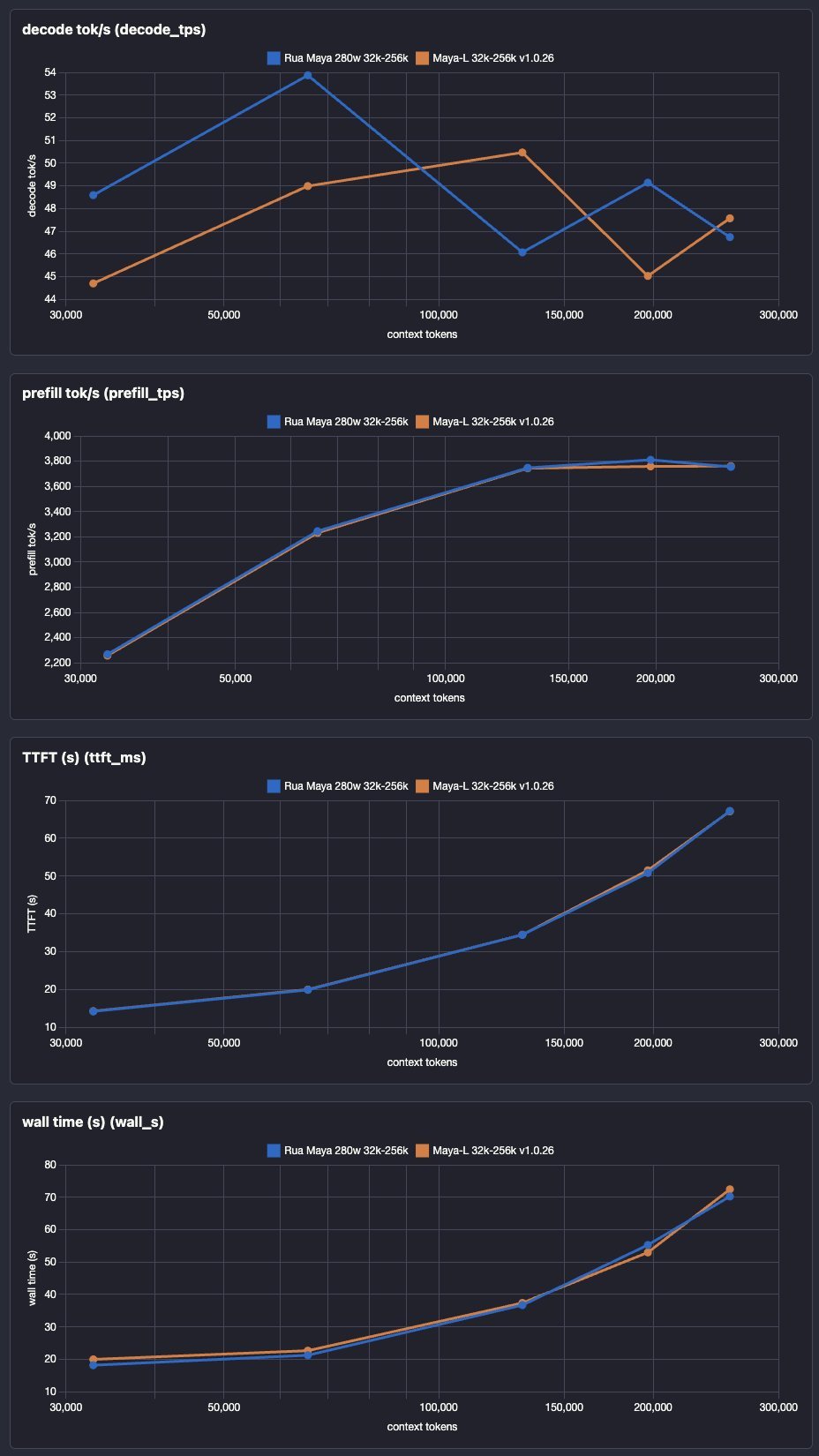
Charts by @axitek, shared on X. The orange line is the Maya-L run in the table above; the blue one is a second setup he labels "Rua Maya 280w".
To see what your own card should deliver on models that fit it whole, our tokens per second checker estimates it.
What Maya 1.1.0 adds
Version 1.1.0, released on 12 October, brings three big additions, and their price is on the card, in memory where Maya would otherwise keep experts. Two take room on the card when Maya starts. The third has bigger experts than every Maya build but Maya-L, so fewer of them fit.
| Addition | What it does | What it costs on the card |
|---|---|---|
Several requests at once (--parallel, up to 8) |
answers up to 8 requests together instead of one after another | at 32K or less, each extra request keeps its own context state in VRAM; four on one V100 32 GB with Maya-S at 32K: about 2.4 GB, by our calculator |
| The DFlash2 drafter (NVIDIA; offered on RTX 30 / A100 and newer) | drafts up to 7 tokens a round, with the same answers | 717 MB on the card with the model's head; about 0.9 GB of one card with its working memory, by our calculator |
| turboderp's EXL3 quant (3.05 bits, experimental, NVIDIA) | a 125.3 GB download, with the MTP block | bigger experts than Maya-M's: 114.6 GB of them in its files, against about 108.6 GB by our estimate, so fewer fit (Maya-L's are bigger still) |
Several requests at once
On one GPU, a token of each request goes through the model together, so the dense weights are read once for all of them, and each request gets exactly the tokens it would get alone (the author checked it with greedy decoding and the CPU lane off, at 2 and 4 at once). On two GPUs or more, each card works on a different request, one behind the other. A request alone decodes as fast as before.
The more of the model sits in VRAM, the more it gains, the author writes, because each conversation brings its own experts. The author's figures, from real chat questions: on a V100 32 GB that streams most of Maya-S's experts from RAM, two requests at once wrote 21.2 tok/s in all against 15.0 one after another (x1.41), and four gave x1.35. On a Strix Halo with all of Maya-S in GPU memory, x1.67 for two and x2.02 for four.
The price is on the card. At 32K or less, each extra request keeps its own context state in VRAM, taken from the expert pool at the start (above 32K, since 1.1.6, see below). In our calculator, four requests at once on one V100 32 GB with Maya-S at 32K and the default cache take about 2.4 GB, and the card holds about 350 fewer experts (3,139 to 2,786). That is our arithmetic from Maya's code for a setup we picked: not a measurement, and not the author's run above.
The DFlash2 drafter
Inco AI's DFlash2 drafter for GLM 5.3 Flash, a 0.7 GB download in Anbeeld's GGUF, drafts up to 7 tokens a round; the model checks them and keeps the right ones, so the answers do not change. It takes the place of the MTP block, which the engine then does not load. @needmorevram measured it with Maya-L over five greedy prompts:
| Machine | Without the drafter | With DFlash2 | Gain |
|---|---|---|---|
| One RTX 3090 | 15.8 tok/s (plain decode: no MTP block on one GPU) | 18.8 tok/s | +19% |
| RTX 3090 + RTX 5060 Ti | 19.7 tok/s (MTP block) | 22.1 tok/s | +12% |
| Nine GPUs: an RTX 3090 and eight RTX 5060 Ti | 42.6 tok/s (MTP block) | 61.4 tok/s | +44% |
The setup offers it on RTX 30 / A100 and newer. On Tesla V100s it was slower than the MTP block, so older cards keep the MTP block, which stays the default. With more than one request at once, the engine decodes without the drafter.
It sits on the card that holds the model's head, where the Q4_K_M drafter takes 717 MB once loaded. Add the verify window and the copy of the recurrent state it works with, and our calculator puts it at about 0.9 GB of a single card. Inco AI's licence for the drafter is CC BY-NC-ND 4.0, which Maya's notes describe as non-commercial use only.
turboderp's EXL3 quant
Maya's engine now reads EXL3 quants in place, with its own kernels, and the setup can download turboderp's at 3.05 bits per weight: 125.3 GB with the MTP block, experimental, NVIDIA only, tested on Linux. Its routed experts are 114.6 GB by the files' headers, against about 108.6 GB for Maya-M by our estimate, so the same card holds fewer of them.
@needmorevram ran it in the pull request that added it, on a build based on v1.0.30, at 16K of context, on two Xeon Gold 6152s with 177 GB of RAM. One RTX 3090 wrote 16.1 tok/s on its first request, with 1,848 of the 12,096 experts in VRAM and the rest in a 99 GB pinned RAM tier, and read a 12,140-token prompt at 530 tok/s. The same machine's nine GPUs held every expert in VRAM and wrote 40.1 tok/s with the MTP block, 27.1 without.
Our Maya calculator counts all three: set Requests at once and Drafting, and the EXL3 quant has its own row. On that RTX 3090 it puts 1,725 experts in VRAM against the 1,848 in the pull request's log, 7% fewer, which keeps it on the safe side.
What changed from Maya 1.1.1 to 1.1.11
Maya 1.1.11 came out on 14 October, the last of four releases that day, and the change that moves the most numbers is the long-context one: since 1.1.6, KV streaming is on by default. The last three releases add a 4.05-bit EXL3 quant, faster Ryzen AI Max APUs and a Monitor that shows what fills each card. The figures below are Maya's release notes unless a contributor is named.
Long contexts stream through RAM
At 32K or less, each request's context state stays on the cards. Above 32K, new setups stream the attention latent through pinned RAM and keep a 32K window in VRAM; each request has its own host cache. Streaming is on by default since v1.1.6, which the release notes and Maya's settings page describe.
The release reports that, on one RTX 3090 at 512K, KV streaming raised the expert cache from 714 to 1,176 slots, made prompts 4 to 9 times faster and improved decode by 5 percent. It also says 1M of context then starts on one RTX 3090, which it does not without streaming. Those are the Maya author's figures, not ours.
Our Maya calculator went live on Maya 1.1.8 on 14 October and models this. With streaming on, which is the default, the card holds the window and the rest of the cache moves to RAM, counted against the RAM tier. It also refuses a setup whose expert pool would get fewer slots a layer than the 8 routed experts one token uses, which is where Maya itself stops. Against the logs in the Maya author's pull request #86, its expert counts sit at or under each logged count, and it reproduces that one RTX 3090 at 1M does not start without streaming.
Setup now measures DFlash2
Since 1.1.3, setup runs a speed calibration on the target PC and keeps the DFlash2 drafter only when it is more than 5% faster. On one GPU it compares against plain decode, on several GPUs against the MTP block. So the 1.1.0 gains above belong to the reported machines, not to every PC. In @erikash's calibration on an RTX 3090 and an RTX 3060, setup kept the MTP block over DFlash2, 30.9 tok/s against 25.5.
EXL3 on Windows, and with the drafter
Version 1.1.1 hid the experimental EXL3 quant from the Windows setup after a crash report, and 1.1.3 brought it back. Version 1.1.4 made EXL3 work with DFlash2, and 1.1.6 made EXL3 with the drafter decode about twice as fast. In pull request #164, DFlash2 ran 15 to 29 percent ahead of the MTP block on an RTX 3090 plus an RTX 5060 Ti across five prompts. Keep that machine and those prompts in mind: it is not a promise for every PC.
Windows and AMD
Version 1.1.7 measures how much memory Windows will let Maya pin and sizes the RAM tier to that limit, instead of leaving a tier below a guessed one. The page-file advice below still stands.
On AMD, Maya's HIP setup remains text-only by default. Since 1.1.8, Linux users can add the CPU-only image encoder manually; this does not add AMD GPU vision support. Windows AMD remains on the experimental HIP path. The same release added a hipBLASLt table for Strix Halo: in pull request #162, @Tsury's 8060S on Linux cut one four-request tool-check prefill from 51.64 to 29.10 seconds, which the pull request calls one matched sanity observation, not a broad performance claim.
turboderp's 4.05-bit EXL3 quant, and tensor-core decode (1.1.9)
Version 1.1.9 puts turboderp's EXL3 quant at 4.05 bits per weight in the setup (--model EXL3-4.05bpw): 165.2 GB with the MTP block, with 4-bit routed experts and mostly 6-bit dense weights. Like the 3.05-bit one it is experimental and NVIDIA only. The notes also say EXL3 now decodes on the tensor cores of RTX 30 and newer (#180 by @needmorevram): the expert kernels run about 1.8x as fast on an RTX 3090 and an RTX 5060 Ti, and decode is 14 to 30 percent faster on an RTX 3090 plus eight RTX 5060 Ti with EXL3 at 4.05 bits, with the MTP block and with DFlash2. On that machine, the release notes report, the layer split for EXL3 packs puts 9 layers on the 3090 instead of 7 and decode is 24 to 27 percent faster, and an 8K prompt reads 6 percent faster.
The answers on those cards are not bit for bit 1.1.8's, because the sums run in the tensor cores' order. A V100, a T4 or an RTX 20 card keeps 1.1.8's kernels, which are faster there: the release notes report the same output over 1,135 scored tokens and the same speed on a V100, with prompts 3 percent faster. Maya's own four builds are unchanged. The notes list one gap: the new EXL3 decode with one to four RTX 30 cards, and on Windows, is not measured yet, and a ./maya.sh --bench report in an issue helps.
Our Maya calculator is now 0.3 alpha, on Maya 1.1.11, and sizes the 4.05-bit build: a 165.15 GB download whose 4-bit routed experts are 152.65 GB, with about 6.2 GiB on the card besides them. We sized it from the model files and checked the method by first reproducing the 3.05-bit build's recorded figures. Those are our sizes, not a run.
Ryzen AI Max APUs, and a complete expert pool on AMD (1.1.10)
Version 1.1.10 is the Strix Halo and Gorgon Halo release. On the Ryzen AI Max APUs (Radeon 8050S, 8060S and 8065S), answers come faster with the same text, and it is on by default on those APUs only. The release notes report one machine: a Gorgon Halo (Radeon 8065S, Ryzen AI Max+ PRO 495 with 192 GB, 160 GB of it for the GPU, which holds all of Maya-S) on Windows 11.
| Maya-S on that Gorgon Halo | Before | 1.1.10 |
|---|---|---|
| 256-token answers, short prompts | 19.7 tok/s | 28.4 to 29.6 tok/s |
| 256-token answers after 3K- and 8K-token prompts | 18.4 to 18.5 tok/s | 23.2 to 23.5 tok/s |
| 3K-token prompt, reading (#98 and #113 by @boxwrench) | 233 tok/s | 271 tok/s |
| 8K-token prompt, reading (#98 and #113 by @boxwrench) | 253 tok/s | 278 tok/s |
Answers of about 600 tokens hold 26.3 and 23.4. The notes say a 128 GB Strix Halo, whose GPU holds less of the model, is not measured yet, and they thank @boxwrench for testing on a Strix Halo. Every other GPU decodes as in 1.1.9.
Where the GPU's budget holds every expert plus the room a prompt borrows, a 192 GB Gorgon Halo under Windows for one, the start now loads all of them (#101), and a long prompt no longer moves experts out to read them back from the SSD: the notes report answers after an 8K-token prompt 7 percent faster. It is on by default on AMD; NVIDIA keeps its pool unless two settings are switched on.
Two more changes are not about AMD. Version 1.1.10 reads a GGUF pack's experts at the start in the order they lie in its files (#182 by @hmartiniano), so a hard disk reads them in one pass instead of seeking, and how much faster depends on the disk. And with STRATA_GLM_DUAL_PREFILL=1, off by default, two NVLinked GPUs stage a prompt's experts over both links (#121 by @q8atnight): Maya-M on two RTX 3090 with NVLink read 1K- and 4K-token prompts 28 and 24 percent faster, and the start checks that peer copies arrive intact.
What fills each GPU, and the pool as a setting (1.1.11)
Version 1.1.11 adds a card to the Monitor with a bar for each GPU (#191 by @needmorevram): the model's weights, the KV cache, the activations, a drafter and its verify window, the expert pool, CUDA and the rest, other programs and the free memory, with that GPU's load, power, temperature and PCIe link under its bar. On two Tesla V100s the release notes report that the parts add up to what the NVIDIA driver shows for each card; on AMD the card shows the engine's own measurement at its start.
The expert pool's size is now a setting in the config (#192 by @needmorevram). --expert-cache auto, the default the setup writes, sizes the pool from the free VRAM less a reserve and then checks that budget once it is written. Under Windows, the notes explain, the free figure read before an allocation can run about a gigabyte high, and a card filled past it pages GPU memory to system RAM, where decode runs several times slower; short of the reserve, the pool gives back the difference. --expert-cache N caps the first GPU's pool, and --vram-reserve-mib N sets the reserve. The check is left out on the Ryzen AI Max APUs, which keep 1.1.10's speed.
What changed from Maya 1.1.12 to 1.1.15
Maya 1.1.15 came out on 16 October, the fourth release in two days, and the notes of the four add speed and supported cards rather than new memory figures. One landed late on 15 October and three on 16 October. The figures below are Maya's release notes unless a contributor is named.
EXL3 faster, on one GPU and on many (1.1.12, 1.1.15)
On one GPU most of an EXL3 model's experts run on the CPU. Version 1.1.12 reads each expert in memory order and runs a route's experts as one batch of jobs (#188 by @needmorevram), and CPUs without AVX-512 get an AVX2 tier of their own. On an RTX 3090 alone the notes report EXL3 at 3.05 bits writing 20.9 to 22.1 tok/s, from 14.3 to 16.8, and 29.2 with DFlash2, from 22.4; the 4.05-bit quant wrote 18.9 to 19.6, from 14.4 to 15.1; an 8K prompt read at 422 to 489 tok/s, from 384 to 396. The answers are the same tokens as before.
Version 1.1.15 speeds EXL3 with DFlash2 on many GPUs (#225 by @needmorevram): pipelined verify rounds, attention on the tensor cores of RTX 30 and newer, and a shorter drafter chain. On an RTX 3090 and eight RTX 5060 Ti with the 4.05-bit quant the notes report 81 tok/s greedy, from 71, 79 sampled, from 69, and 59 on 32K-token documents, from 46, with the same tokens as without drafts. Every part has a setting to turn it off.
Batched answers across a layer split (1.1.12)
An opt-in. With STRATA_GLM_SPLIT_ROWS=k (1 to 8) and several requests at once, each GPU of a split takes up to k requests in one step (#204 by @zetlaw). On four RTX 4000 Ada GPUs with Maya-M and eight requests, k=2 gave 94.5 tok/s in all against 74.4 (+27%); larger groups were slower there, so it is off by default.
The VRAM tier follows the conversation (1.1.12, 1.1.13)
With the DFlash2 drafter's verify window on two CPU lanes, the background swaps that move the experts you use into VRAM had stopped; 1.1.12 starts them again (#198 by @merbanan). On a V100 with a Ryzen 9 7950X the share of experts found in VRAM went from 49 to 62 percent to 54 to 67 percent. Version 1.1.13 changes which expert leaves VRAM when a fetched one needs room (#210 by @saatvik-viniak): with one conversation, the least recently used, not the least used by the aged counts. On three Tesla V100 16 GB with Maya-S at 128K, decode went from 24.8 to 26.5 tok/s. With several conversations at once the old rule stays, and STRATA_GLM_VRAM_EVICT=lru or least chooses either. With one conversation the new rule keeps other experts in VRAM, so where the CPU computes the rest an answer can differ from 1.1.12's.
Prompts (1.1.13, 1.1.15)
Version 1.1.13 sets the end of a long system prompt aside on disk, so another chat that starts with it reads only its own part (#179), and renders chats with zai-org's chat template of 15 October: the same prompts byte for byte over 288 test conversations, and a chat with many tool calls prepared up to about 15 times faster. Version 1.1.15 runs the prompt attention of Tesla V100 and RTX 20 cards in two passes (#196 by @merbanan): on one V100 a 27K-token prompt's attention went from 22.5 to 11.8 s and the whole prompt from 78.4 to 67.9 s.
More cards (1.1.12 to 1.1.15)
- NVIDIA Pascal, experimental (1.1.14, #214 by @Jw88888): the Tesla P40 and P100 and the GTX 10 series. Two Tesla P40s decode Maya-S24 at 28 tok/s with the same answers; Maya has not been validated on these cards.
- AMD: RDNA 2 (RX 6800 and 6900, Radeon PRO V620 and W6800) as experimental since 1.1.12, not validated; a discrete AMD GPU together with a Ryzen AI Max APU and an experimental expert helper in 1.1.13 (#201 by @zhedang); on a Windows Strix Halo with a 96 GB share, 8K-token prompts read at 62 tok/s instead of 159 because the pool filled into paged shared memory, fixed in 1.1.13 (#206); on a Radeon 8060S under Linux with ROCm 10, 2K-token prompts from 204 to 341 tok/s and 8K from 217 to 373 (#203 by @boxwrench); EXL3 on AMD GPUs, experimental, with no speed tuning yet (1.1.15, #186 by @izabera).
- unsloth's UD-Q6_K_XL and Q8_0 GGUFs of GLM-5.3-Flash (1.1.14, #216 by @Xar1c) stopped at start with
unresolved weights; they run now. - A faster CPU lane on CPUs with AVX-512 VBMI (1.1.15, #227 by @cryptedy): decode +6 to 8 percent on a Zen 5 where the CPU computes Maya-S or Maya-S24's experts, with exactly the same results.
- DFlash2 on a V100 with little free VRAM (1.1.15, #195 by @merbanan): the drafting windows failed with "out of memory" once the pool had taken the VRAM down to a few hundred MB; they run now.
- Skipping light experts, opt-in (1.1.15, #228 by @cryptedy):
STRATA_GLM_MISS_SKIP_Wleaves out a routed expert that is not in VRAM and carries little of the route's weight. It is faster on RAM-bound PCs and changes the answers, so it is off by default.
As shipped, three faster paths in 1.1.15 add the same numbers up in another order, so an answer can differ from 1.1.14's in places: prompts on V100 and RTX 20, decode on RTX 30 and newer, and conversations under 2048 tokens on any GPU. The notes list the settings that give 1.1.14's tokens back.
Our Maya calculator has not been revised for these four releases: it stands on Maya 1.1.11, and none of the four sets of notes gives a new figure for what a build or the drafter takes on a card.
What moving the experts off one 96 GB card costs
On one RTX PRO 6000 Blackwell 96 GB, Maya-S wrote 71.7 to 71.9 tok/s with every expert in GPU memory, 50.9 with about half and 33.8 with about 4 percent, and read a 129,586-token prompt just as fast with half the pool as with all of it. With about 4 percent it read the prompt at 41 tok/s, and the first token took about 53 minutes. This is our own run, not an owner's report.
The receipts: Project Maya v1.1.15 on Linux, Maya's own engine, an NVIDIA RTX PRO 6000 Blackwell 96 GB (94.97 GiB by Maya's count, ECC on) with 189.9 GB of system RAM, the Maya-S-v2-IQ2_XXS build (three files, 96,468,592,256 bytes), a 131,072-token window, one prompt of 129,586 tokens by Maya's count, an answer capped at 256 tokens, temperature 0, one request at a time, Maya restarted for each placement. Maya prints sizes in GiB under a "GB" label, and the "GB" figures below are Maya's.
| Placement | Experts in VRAM | System RAM used | First token | Reading the prompt | Writing |
|---|---|---|---|---|---|
All (--expert-cache auto; two starts, the second a repeat) |
12,222 slots for 12,096 experts; pool 81.01 GB | 16.4 GB | 41.26 and 41.28 s | 3,141 and 3,139 tok/s | 71.69 and 71.86 tok/s |
About half (--expert-cache 6048) |
6,406 slots; pool 42.55 GB | 58.1 GB | 41.05 s | 3,157 tok/s | 50.88 tok/s |
About 4% (--expert-cache 504) |
535 slots, 12 to 19 a layer; pool 3.54 GB | 90.8 GB | 3,160.48 s (about 53 minutes) | 41.0 tok/s | 33.78 tok/s |
Moving experts to RAM costs writing speed gradually. Reading the prompt does not degrade gradually. At half the pool it was unchanged. At the floor it collapsed, because Maya's prompt path borrows slots of the expert pool (6,612 MB at this window) and a pool of 12 slots a layer has none to lend. Maya says so in its own log: "the expert pool (12 slots a layer) can lend no prompt chunk (–prefill auto) – token by token". System RAM follows the experts moved off the card: 16.4, 58.1 and 90.8 GB.
Before the pool, Maya's start line reads: "VRAM before the expert pool: 8.55 of 94.97 GB in use – dense weights 6.86, state/KV (131072 ctx) 0.74, activations 0.06, other (context, MTP, scratch, prompt path) 0.89". Before the run we put the Maya calculator's predictions on file: every expert in VRAM, 7.37 GB of dense weights (6.86 in Maya's GiB) and 0.80 GB of state at this window (0.745 GiB). The log gave 12,222 slots for 12,096 experts, 6.86 and 0.74, so the calculator held on all three.
No run used the DFlash2 drafter. We expected one to. The setup downloaded the drafter (697,017,248 bytes), then ran its speed calibration on this card: 63.9 tok/s with DFlash2 against 75.2 with no drafting, and it kept no drafting ("DFlash2 is not faster on this PC … Maya decodes without drafting"). The configuration of every run holds no --dflash, and this build drops the MTP block when it is packed, so all four runs decode without drafting. The 71.7 to 71.9 above is plain decode, and the run says nothing about what DFlash2 costs on the card. For comparison, the README lists @yundddd's RTX PRO 6000 Blackwell 96 GB with Maya-M at 256K of context at 81.0 tok/s writing and 3,102 reading; it is a different build and window, and ours is one machine, one prompt and one run per placement.
What you need
The Maya calculator answers this for your own machine: pick one card, several of the same or two different ones, your RAM and a context, and it shows which build runs and what sits on the card, in RAM and on the SSD.
From the README's requirements:
| GPU | NVIDIA, compute capability 7.0 or newer (the V100, the RTX 20 series at 7.5, and newer). One card, or up to 16 that share the model. More VRAM holds more experts and is faster. |
| RAM | It runs with 32 GB; the 2x V100 machine above has 30 GB. More RAM keeps more experts close; what does not fit is read from the SSD while it answers. |
| Disk | About 100 GB free on an NVMe SSD for Maya-S (Maya-M about 120 GB, Maya-L about 160 GB). The README is explicit: not a hard disk. |
| System | Linux on x86-64, an AVX2 CPU preferred, the NVIDIA driver and CUDA toolkit 12.x (CUDA 13 no longer compiles for Volta). Windows 10 and 11 are experimental. WSL2 is not supported. |
| AMD | Experimental on Linux with ROCm 7 and, since v1.0.30, on Windows: RX 7900 XT and XTX, Radeon AI PRO R9700 and RX 9070 (one card or two), and Strix Halo or Gorgon Halo (Radeon 8060S or 8065S, one). Text only by default; since v1.1.8, Linux users can add a CPU-only image encoder by hand. |
RAM is where the rest of the model lives. The engine pins all but about 6 GB of free RAM for its expert tier at start. With enough RAM to hold every expert that is not on the card, one setting keeps them all there and nothing is read from disk. With a second (PROMOTE_MIN=6), @handmade0octopus's RTX 4090 D with 128 GB went from 11.8 to 22.1 tok/s at 256K context in the author's release notes. With less RAM, experts come from the SSD while the model writes, and a slow drive shows.
On Windows, size the page file. Since v1.1.7 Maya sizes its RAM tier to the memory Windows will let it pin, but the commit limit still applies. Windows charges memory on the graphics card to RAM plus the page file, and Maya pins tens of gigabytes. @anbow1's RTX 5090 ran at 2.4 to 4.1 tok/s until a 64 GB page file raised the limit; the README now says to check the page-file size even with "System managed" on, because it can stay too small on a PC with a lot of RAM, and its --check asks for about the cards' total VRAM plus 9 GB.
Pictures, tools and thinking
Maya reads images on NVIDIA: it compiles an image encoder (1.1 GB) that runs only while a new picture is read, in GPU memory the model lends it. Maya's author explained the trick on X, quoting our post about this article: the encoder waits on the SSD, moves into VRAM when a picture arrives and goes back afterwards. That costs one to two seconds before the image is read, and in exchange the cards hold as many experts as possible the rest of the time. Asked by us, he put the VRAM it frees at about 2.9 GB, from when vision first ran on a single card. The AMD path is text only by default; since v1.1.8, Linux users can add a CPU-only image encoder by hand.
It serves an OpenAI-compatible API at http://127.0.0.1:8080/v1 and Anthropic's messages API at /v1/messages on the same port, and tool calls stream through both, so coding agents can connect to either. Maya exposes GLM's thinking levels as Off, Low, High and Max, with High as its default; Z.ai's own API default is Max. A reasoning block is capped at 32K tokens before the answer follows. The dashboard shows the expert caches and the GPU, CPU and RAM live, and what a context size costs in GPU memory on your PC.
Maya or TensorFold?
TensorFold also runs GLM 5.3 Flash, so the two are easy to confuse. They solve opposite problems.
TensorFold makes a model that already fits run faster. It drafts tokens ahead and guarantees the reply is the same, token for token, as the same engine with drafting off. Its archives target Macs on Apple Silicon and the DGX Spark's GB10 chip, machines that hold the whole model in memory, and since 1.0.4 RTX 30 series cards on Linux, where it serves Nemotron. Its 1.0 line qualifies GLM 5.3 Flash on two M5 Ultra Macs together, and since 1.0.5, on 10 October, its notes run it on one M5 Ultra with 256 GB; and from 1.1.0, on 18 October, the native line runs GLM 5.3 Flash across two CUDA ranks on Mia-AiLab's EXL3 checkpoint with the DFlash2 drafter; before 1.0, owners such as @jayleaton and @WescheNex1q ran it on two DGX Sparks.
Maya makes a model that does not fit run at all. It runs on ordinary NVIDIA cards with far less memory than the model and fetches experts from RAM and the SSD as it writes. It runs GLM 5.3 Flash alone, where TensorFold's qualified list names several models.
If you have an M5 Ultra with 256 GB, or two, TensorFold is the speed route; on NVIDIA machines that hold the whole model, Z.ai's card points to vLLM and SGLang. If your machine cannot hold it, Maya is the one that starts.
Maya or Strata?
They answer different questions. Strata runs Qwen 3.8 Flash Next, which reads about a third as many parameters per token, so it should be the faster of the two on the same machine. Maya runs GLM 5.3 Flash, the stronger generalist in @WescheNex1q's Spark-Bench, at a lower speed. Both need far less VRAM than the model's size, and both reward RAM.
They also reach different machines. Strata is the more open of the two; Maya is built around NVIDIA:
| Strata | Project Maya | |
|---|---|---|
| Cards | NVIDIA RTX 20 to 50 series, and AMD Radeon from the RX 6800 to the RX 9070 XT and R9700, 12 GB of VRAM or more | NVIDIA, compute capability 7.0 or newer (the V100, the RTX 20 series and newer) |
| System | Windows 10 / 11 or Linux, the same steps for NVIDIA and AMD | Linux; Windows experimental; WSL2 not supported |
| AMD | supported on both systems; pictures on Linux through the processor | experimental, on Linux and, since v1.0.30, on Windows; text only by default |
| Experimental | older cards (Tesla P40 and V100, GTX 10, Radeon VII and MI50), Intel Arc and Strix Halo on Linux, CPUs without AVX2 | Strix Halo's Radeon 8060S, one card |
| Pictures | NVIDIA, and AMD on Linux | NVIDIA; AMD on Linux only through a CPU-only encoder added by hand, since v1.1.8 |
| Disk | about 80 GB, an SSD if you can | about 100 GB on an NVMe SSD, not a hard disk |
So on an AMD card or on Windows, Strata's support is the settled one today and Maya's is experimental, and older cards, Intel Arc and CPUs without AVX2 are on Strata's list only. Maya's own README says it is developed and measured on Linux, and its NVIDIA path is where most of the speed reports above come from.
If you want to check Strata on your own PC first, our Strata calculator shows which Flash Next build runs and where each part lives, with measured runs from owners whose machines are closest to yours. To size the full GLM 5.3, the 753B model rather than the Flash, see the GLM 5.3 VRAM page.
How to run it
On Linux, with the NVIDIA driver and CUDA toolkit installed:
git clone https://github.com/mw00/project-maya.git && cd project-maya
./setup.sh
The setup checks the PC, asks which cards (up to 16), how much context (32K recommended) and which build, shows every download with its size before it starts, compiles the engine for your GPU and opens the dashboard at http://127.0.0.1:8080. The first run takes 20 to 40 minutes plus the download. On Windows the same options run through START-MAYA.bat.
FAQ
What is Project Maya?
An open-source engine (MIT) that runs GLM 5.3 Flash, Z.ai's 320B mixture-of-experts model with about 18B active per token, on one or more NVIDIA cards with as little as 32 GB of RAM, by keeping the most-used experts on the card, the next in RAM and the rest on an NVMe SSD. It grew out of Strata.
How fast is Project Maya?
Its author measured up to 40 tok/s writing on two Tesla V100 32 GB cards with 30 GB of RAM, and up to 19 on one V100. Owners report 118 tok/s on four RTX 4090s with Maya-S24 (@0xPreDa), a mean of 61.3 on two CMP 170HX cards with every expert in VRAM (@ZackO2o), 53.0 on two RTX 3090s with Maya-S24 (@briepala), over 30 on an RTX 5090 with 96 GB of RAM (@siganos, without bench details), a mean of 22.6 on four Tesla T4s (@ksanislo), and 47 with the largest build at 256K of context on seven RTX 3090s (@axitek). With the DFlash2 drafter added in 1.1.0, @needmorevram's nine GPUs wrote 61.4 tok/s with Maya-L over five greedy prompts, from 42.6 with the MTP block.
How much RAM does Project Maya need?
It runs with 32 GB, and the author's two-V100 machine has 30 GB. More RAM is faster: with enough to hold every expert that is not on the card, nothing is read from the SSD. With two settings, @handmade0octopus's RTX 4090 D with 128 GB went from 11.8 to 22.1 tok/s at 256K context.
Does Project Maya work on Windows or AMD?
Both are experimental. Windows 10 and 11 build and run with Visual Studio 2022 and CUDA 12.8; check the page-file size even with "System managed" on, as the README advises. WSL2 is not supported. AMD runs on Linux with ROCm 7 and, since v1.0.30, on Windows, on the RX 7900 XT and XTX, R9700, RX 9070 and Strix Halo or Gorgon Halo. The HIP setup is text only by default; since v1.1.8, Linux users can add a CPU-only image encoder by hand. Since v1.1.7 the Windows RAM tier is sized to the memory Windows will let Maya pin. Since v1.1.10 the Ryzen AI Max APUs decode faster, and on AMD every expert stays in GPU memory where it fits. One owner reports 12 to 16 tok/s on an RX 7900 XTX with 64 GB of RAM (@Chromadera); on v1.0.15, @boxwrenchx reports 28 tok/s writing and 800 reading on an R9700. The DFlash2 drafter and the EXL3 quants (3.05 bits since 1.1.0, 4.05 bits since 1.1.9) are NVIDIA only, and the 3.05-bit EXL3 quant was tested on Linux.
What is new in Project Maya 1.1.0?
Released on 12 October, it answers up to 8 requests at once (--parallel), adds DFlash2 drafting on NVIDIA, offered on RTX 30 / A100 and newer, and runs turboderp's EXL3 quant at 3.05 bits, experimental and NVIDIA only. In @needmorevram's runs with Maya-L over five greedy prompts, the drafter gained 44% on nine GPUs and 12% on two against the MTP block, and 19% on one RTX 3090 against plain decode. Each extra request and the drafter take room on the card that would otherwise hold experts: about 0.9 GB for the drafter on one card, by our calculator.
What changed in Project Maya between 1.1.0 and 1.1.11?
Four releases came out on 14 October, ending with 1.1.11, after a run that began with 1.1.1 on 12 October. The one that moves memory is 1.1.6: KV streaming is on by default, so above 32K of context each request's attention latent lives in pinned RAM with a 32K window on the card. Setup also calibrates DFlash2 on your PC since 1.1.3 and keeps it only if it is more than 5% faster. Version 1.1.9 adds turboderp's EXL3 quant at 4.05 bits (165.2 GB) and tensor-core decode for EXL3 on RTX 30 and newer; 1.1.10 makes Ryzen AI Max APUs faster and keeps every expert in GPU memory on AMD where it fits; 1.1.11 adds per-GPU memory bars to the Monitor and the expert pool's size as a config setting. Our Maya calculator is 0.3 alpha on 1.1.11 and sizes the 4.05-bit build.
What changed in Project Maya between 1.1.11 and 1.1.15?
Four releases in two days, 15 and 16 October. EXL3 is faster on one RTX 3090 (the 3.05-bit quant from 14.3 to 16.8 up to 20.9 to 22.1 tok/s in 1.1.12) and with DFlash2 on many GPUs (71 to 81 tok/s on an RTX 3090 and eight RTX 5060 Ti in 1.1.15). Batched answers across a layer split are opt-in, the VRAM tier follows the conversation, Pascal cards (1.1.14) and AMD RDNA 2 are experimental, V100 prompts and the CPU lane on AVX-512 VBMI are faster in 1.1.15, and unsloth's Q6_K_XL and Q8_0 GGUFs run. Our Maya calculator still stands on 1.1.11.
What did we measure on one RTX PRO 6000 Blackwell 96 GB?
Maya v1.1.15 with Maya-S, a 131,072-token window and a 129,586-token prompt wrote 71.7 to 71.9 tok/s with every expert in VRAM, 50.9 with about half and 33.8 with about 4 percent, and read the prompt at about 3,150 tok/s until the pool dropped to 12 slots a layer, where it fell to 41 tok/s and took about 53 minutes to the first token. No run used DFlash2: Maya's speed calibration found it slower on that card and kept no drafting.
Is GLM 5.3 Flash better than Qwen 3.8 Flash Next?
In @WescheNex1q's Spark-Bench on two DGX Sparks, GLM 5.3 Flash scored a TrueScore of 84.8 against 79.4 and 77.9 for Flash Next, on different engines and quantizations, with the widest gap on long context; the tester's previous version had Flash Next ahead. Flash Next should run faster on the same hardware, because each of its tokens reads about a third as many parameters, which is arithmetic on the two model cards rather than a measurement.