How Does a 118B Model Run on a 12GB GPU?
It doesn’t: not the way you’d assume. Nobody is holding a 118-billion-parameter model entirely in 12GB of VRAM; that’s not physically possible at any reasonable quantization. What’s actually happening is expert offloading: most of the model’s weights sit in ordinary system RAM, and only a small, constantly-changing slice touches the GPU. A community benchmark posted July 23, 2026 measured exactly this: Poolside’s newly-released Laguna S-2.1 (118B total, ~8B active MoE, confirmed on Poolside’s own model card), on an RTX 3060 12GB, using 10.1 GB of VRAM and generating at ~23 tokens/second. Full server commands and methodology included, from a named tester with a track record of similar published benchmarks: reproducible, not yet independently reproduced by a second party as of this writing. Here’s the technique, the honest numbers with appropriate caveats, and, because this is a VRAM site, exactly what changes when you ask “what would it cost to run this the normal way.”
The Benchmark
Posted by @ItsmeAjayKV on X, July 23, 2026: a named account with a visible track record of similar methodical llama.cpp benchmarks on other models (Qwen3.6-35B-A3B, Gemma 4 12B), consistently disclosing hardware and exact build details rather than posting bare claims. Full methodology here too, not a vague number:
Laguna S-2.1 (118B MoE, ~8B active) running on a single RTX 3060 12GB 🤯🤯🤯
Setup: Laguna-S-2.1-UD-IQ3_S.gguf (Unsloth’s dynamic IQ3_S quant), llama-server, flags -ngl 999 --n-cpu-moe 44 -fa on.
| KV cache | Context | Prefill | Decode | VRAM |
|---|---|---|---|---|
| F16 (default) | ~32K usable | ~186 to 203 tok/s | ~23 to 25 tok/s (23.16 at 28K) | ~10.1 GB |
| Q8_0 | 64K unlocked | ~183 to 205 tok/s | ~14 to 21 tok/s (drops with context) | ~10.3 GB |
The full table, including per-context-length prefill/decode figures out to 65,536 tokens and the exact llama-server invocation for both runs, is reproduced in the screenshot below.
The honest trade the poster’s own data shows: Q8_0 KV cache roughly doubles usable context (32K → 64K) for almost no prefill cost, but decode speed degrades faster under it as context grows: a 2.6% slowdown at 2K tokens widens to a 10.5% slowdown at 28K. Real trade-off, not free.
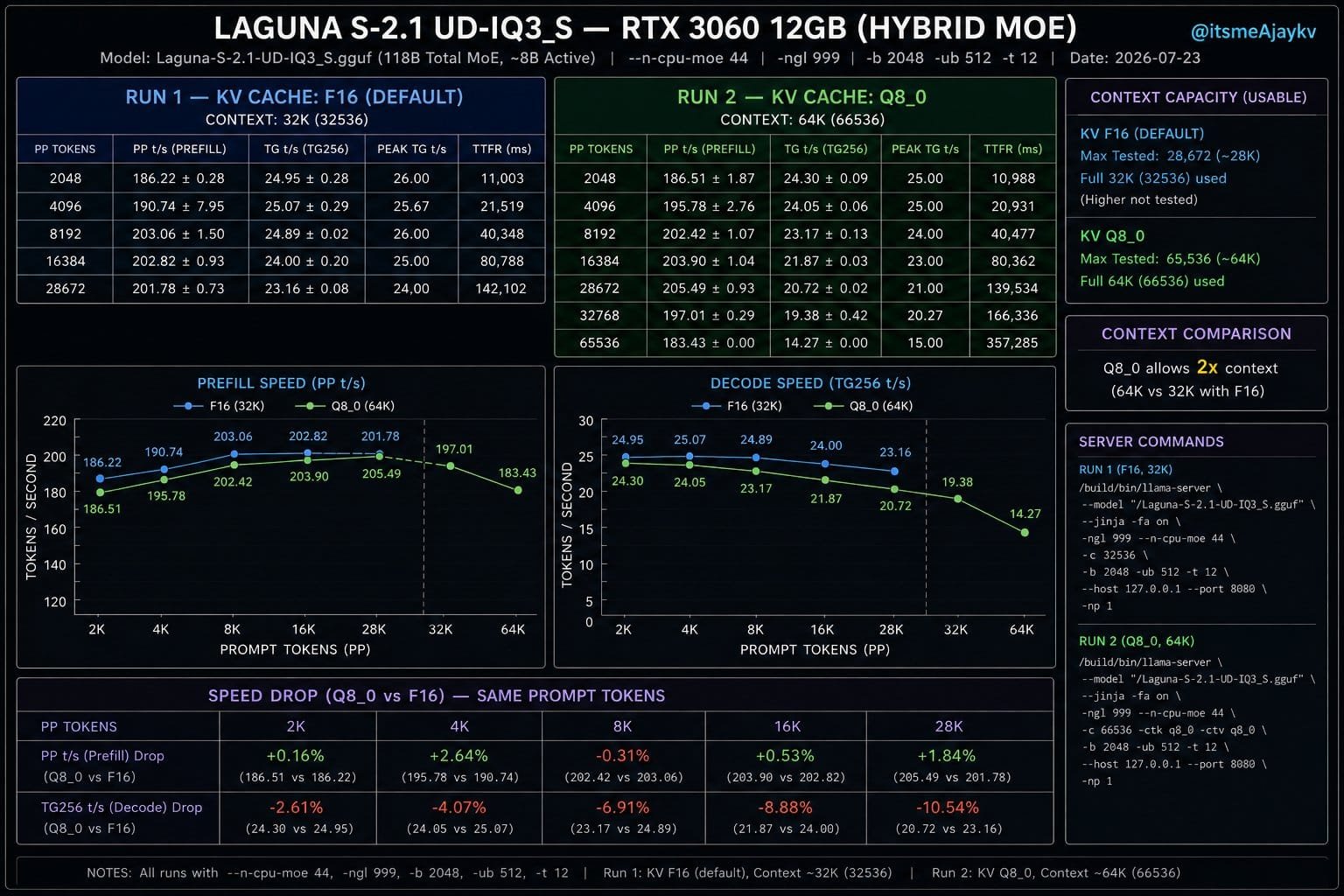
full benchmark chart with both run tables and server commands. Caption: “Full methodology from the original benchmark: both KV configurations, per-context-length results, exact llama-server flags.”]
Why This Works: Sparsity, Not Magic
Laguna S-2.1 is a Mixture-of-Experts model. Poolside’s own model card is specific: “118B total, ~8B activated per token”, with “256 routed (top-10) plus 1 shared expert”, so every token fires 10 selected experts plus one that’s always active, roughly 8B parameters’ worth of compute out of the 118B total. The --n-cpu-moe flag exploits exactly this sparsity: attention layers and the shared expert stay resident on the GPU for speed, while the bulk of the 256-expert pool lives in system RAM. Because any single token only needs 10 of those 256 experts, most of the model can sit in slower memory without being on the critical path most of the time. The poster’s own summary: “Most routed experts are offloaded to the CPU, with only a handful remaining on the GPU.”
Is 23 tokens/second plausible for this setup? We ran our own rough check rather than take the number on faith. Reading ~10 routed experts from system RAM per token, at IQ3_S quantization, works out to roughly 2.7GB of data per token, which at 23 tokens/second requires sustained RAM read bandwidth around 63GB/s. A modern dual-channel DDR5 desktop kit realistically delivers 55 to 70GB/s. That’s a plausible match, not a stretch: it doesn’t independently confirm the exact figure, but it rules out the claim being physically impossible, which is the more useful bar for a single-source number.
This is a different mechanism from the two other “make a big model fit” techniques we’ve covered. Sliding-window attention (which Laguna also uses, more below) shrinks the KV cache. Disk streaming moves weights to an NVMe drive and reads them per-token, at NVMe speed. CPU-MoE-offload moves weights to system RAM: much faster than disk, much slower than VRAM, and only viable because MoE sparsity means most of those weights are idle most of the time.
What Our Calculator Computes Differently: and Why That’s Not a Contradiction
Laguna S-2.1 is now in our calculator, using its own official architecture: hybrid sliding-window attention (12 of 48 layers global, the rest cache only a 512-token window: the same mechanism we cover in depth here) and 256 experts, top-10 per token.
Select it at the closest match to the benchmark’s quant (Q3_K_M, the nearest standard tier to Unsloth’s dynamic IQ3_S) and the calculator returns ~58.8 GB: weights plus KV cache, held entirely in VRAM.
That is not a contradiction of the 10.1 GB figure. It’s a different question, answered honestly:
| What it computes | Laguna S-2.1, ~Q3-class | |
|---|---|---|
| Our calculator | Full VRAM residency: everything held on-card | ~58.8 GB |
| The benchmark | CPU-MoE-offload: most experts in system RAM | ~10.1 GB |
Full residency is what you need for maximum, uncompromised speed with everything on the fastest memory available. CPU offload is what you accept when you don’t have that VRAM budget and are willing to trade speed for capacity: the benchmark’s own ~23 tok/s decode is real and usable, just not what a fully GPU-resident setup would deliver. Our calculator intentionally does not model offload scenarios: it answers “what does full residency cost,” which is the number that tells you whether you need this technique at all.
Should You Use CPU-MoE-Offload?
Yes, if:
- You’re running a large MoE model and don’t have (or don’t want to buy) enough VRAM for full residency
- ~15 to 25 tokens/second is fast enough for your use case (chat, drafting, non-real-time work)
- You have decent system RAM and a reasonably fast CPU
No, if:
- You need maximum throughput or are serving multiple concurrent users
- Your model is dense, not MoE: offloading a dense model’s weights to CPU has no sparsity to exploit and the slowdown is far worse
- You’d rather just check what fits your GPU natively at full speed: an RTX 3060 12GB comfortably runs several dense 7 to 14B models fully resident, no offload trade-off required
FAQ
How much VRAM does Laguna S-2.1 need?
It depends which question you’re asking. Held entirely in VRAM (full residency), our calculator computes roughly 59GB at Q3-class quantization. Using CPU expert offloading (--n-cpu-moe in llama.cpp), a community benchmark measured just 10.1GB VRAM on an RTX 3060 12GB, with system RAM holding the rest and real generation speed around 23 tokens/second.
What is n-cpu-moe in llama.cpp?
A flag that keeps a specified number of MoE expert layers on the CPU instead of the GPU, while attention layers and a handful of “hot” experts stay GPU-resident. It works because Mixture-of-Experts models only activate a small fraction of their total experts per token: most of the model can sit in slower system RAM without blocking every token.
Can I run a 118B parameter model on a consumer GPU?
Yes, with CPU expert offloading, if the model is MoE (not dense) and you have enough system RAM to hold the offloaded experts. Expect roughly 15 to 25 tokens/second rather than the higher throughput of full GPU residency, based on the one published benchmark available as of this writing.
Does quantizing the KV cache help with MoE offloading?
It extends usable context significantly: one benchmark saw 32K context double to 64K by switching KV cache from F16 to Q8_0, for minimal VRAM cost. The trade-off is decode speed, which degrades more at long context under Q8_0 than F16 does. See our llama.cpp performance flags guide for the general KV-quantization trade-offs.
Why does the VRAM calculator show a much higher number than this benchmark?
Because they answer different questions. The calculator computes full VRAM residency: holding the entire model on the GPU, the configuration for maximum speed. The benchmark uses CPU offloading, where most of the model’s weights live in system RAM and only a fraction touch the GPU at once. Both numbers are accurate; they describe different ways of running the same model.