Which llama.cpp performance flags matter, and in what order?
Set them in this order: size the model first, then GPU layers, then MoE offload, then context, then the KV cache type, then speculative decoding, then multi-GPU split. Each step changes what the next one can do, which is why a flat list of twenty flags leaves people slower than they started. Every step below carries a cost somebody measured on a real card, attributed to the person who ran it. One table is ours, the CPU run in step 6, and it carries the machine it came from. Everything else belongs to the person who ran it. One correction first, because the July version of this page got it wrong: we called KV cache quantization neutral for speed. The only controlled test we have found says it cost 37% of decode at long context.
Flag names below match the llama.cpp server README as of September 2026. They move. Check yours with llama-server --help before copying a command.
Step 1: Size the model before you touch a flag
Put the model, quant and context into the calculator, or pick your card in the GPU checker. It answers one question: does it fit entirely in GPU memory at that context?
That answer decides your path.
| The calculator says | Your path |
|---|---|
| Fits with room | Steps 2, 3 (-ngl all), then 5 to 11. Offload flags do nothing for you |
| Does not fit, and it is a MoE model | Step 4 before anything else |
| Does not fit, and it is a dense model | Step 3, then step 5, and expect a large speed cost |
The tools only size the fully resident case. How fast a model runs with half of it in system RAM depends on your RAM speed, your PCIe link and which tensors you move, which is why the steps below give measured examples instead of a formula.
Step 2: Use a current build and record a baseline at your real depth
A rebuild can move speed as much as a flag: Alex K. Miller's rebuild for his AMD cards was part of a 19.2 to 29.7 tok/s jump (step 10). Before changing anything, run llama-bench or one real request at the context depth you actually use. Speed at 512 tokens can be far from speed at 100K. In llama.cpp issue #27796, a q8_0 KV cache went from 7% slower than f16 at zero depth to 21% slower at 131K on the same card.
Two rules make the baseline worth comparing against later, both from Jake's llamAmpere v0.3 write-up, one of the most carefully logged benchmark reports we have read:
- Count tokens from the server, not from streamed chunks. He notes that counting chunks from an engine that emits several tokens per chunk reads 20 to 25 tok/s when the real figure is several times higher. Use
completion_tokensand the server's own timings. - Watch for repetition loops. Text that repeats is easy to predict, so a run that falls into a loop posts an inflated speed, especially with speculative decoding on. He excluded every looping run from his tables.
Step 3: Put every layer on the GPU with -ngl, or know the cost of not doing it
-ngl sets the "max. number of layers to store in VRAM, either an exact number, 'auto', or 'all'", and the default is now auto (server README). If step 1 said the model fits, use -ngl all.
On a dense model that does not fit, lowering -ngl works, and it is slow. Every token passes through every layer in order, so the layers left on the CPU set the pace.
What it costs, measured: @analogalok ran Qwen3.8 27B, a 14.6 GB UD-IQ4_XS build, on an 8 GB RTX 4060 laptop with -ngl 25, a q4_0 KV cache and 64K context. It ran at 150 tok/s prefill and 5 tok/s decode. It works. It is not interactive. The same model runs anywhere from 5 to 144 tok/s depending on where it sits.
Before accepting that, try a smaller quant that fits whole. And if you want to keep the bigger quant, step 4b moves a smarter part of the model than whole layers.
Step 4: MoE model that does not fit? Offload the experts, not the layers
A mixture of experts model only uses a few experts per token. The attention and shared weights run every token; each expert does not. So the trick is to keep attention and the KV cache on the GPU and push expert weights to system RAM.
Two flags do it:
--cpu-moekeeps all MoE expert weights on the CPU.--n-cpu-moe Nkeeps the expert weights of the first N layers on the CPU. Lower N until VRAM runs out, then step back by one.
What it costs, measured: @analogalok, RTX 4090 with 110 GB of DDR4, Qwen3.8-Flash-Next UD-Q4_K_XL at 80K context:
| Setting | VRAM used | Decode | Prefill |
|---|---|---|---|
--n-cpu-moe 40 |
23.85 GB | 22.52 tok/s | 383.85 tok/s |
--cpu-moe |
11.66 GB | 20.84 tok/s | 355.72 tok/s |
Half the VRAM for about 7% less decode. With experts in system RAM, RAM bandwidth becomes the ceiling. @ItsmeAjayKV puts dual-channel DDR5-6000 at about 96 GB/s in theory, against 76.8 GB/s for DDR4-4800, and with MTP on, his offloaded Flash-Next on an RTX 3090 decoded at 31 tok/s at 16K and 38 at both 32K and 64K. Decode that holds while the cache doubles is consistent with a bandwidth limit, though one rig cannot prove it.
Step 4b: The same idea on a dense model, with --override-tensor
A reader, @SandhuJonathan, replied to one of our posts with a recipe that applies this to a dense model too. His point was fair: our calculator answers "fully resident in VRAM", and a model that is not fully resident can still run. The tools will keep answering the narrower question. The method belongs here.
The idea: request every layer on the GPU, then move only the feed-forward (FFN) tensors of some layers to system RAM with --override-tensor, instead of throwing whole layers across PCIe. Attention and the KV cache stay on the card. His starting command for Qwopus3.8-27B-Flash, a Qwen3.8 27B fine-tune, at Q4_K_M on a 16 GB RTX 5080, on Windows:
.\llama-server.exe `
  -m .\Qwopus3.8-27B-Flash-MTP-Q4_K_M.gguf `
  --mmproj .\mmproj-F32.gguf `
  --no-mmproj-offload `
  --fit off `
  --load-mode none `
  --n-gpu-layers all `
  --override-tensor "blk\.(63|25|55|56|57|58|59|60|61|62|24|26|50|52|53|54)\.ffn_.*=CPU" `
  --ctx-size 32768 `
  --parallel 1 `
  --flash-attn on `
  --cache-type-k q4_0 `
  --cache-type-v q4_0 `
  --batch-size 2048 `
  --ubatch-size 512 `
  --jinja
What each unusual line does:
--override-tensor "blk\.(...)\.ffn_.*=CPU"sends the FFN tensors of those 16 blocks to the CPU. The block list is his choice for this model, not a rule.--no-mmproj-offloadkeeps the vision projector off the GPU. He puts it at 1.84 GB.--fit offstops llama.cpp from adjusting unset arguments to fit memory by itself, so the placement you asked for is the placement you get.
His order of work matters more than the command: start at 32K context, get it running, then move FFN groups back onto the GPU one at a time until it no longer fits, and keep the fastest placement that does. Only after that, test the model's MTP head (step 8), because with system RAM in the loop he warns not to assume speculation still helps. Measure it.
He also mentioned a run at 64K context on an RTX 5080. We could not find where it was published, so no speed figure from it appears here.
Step 5: Set the context you need with -c
The README gives -c a default of 0, which loads the context size from the model itself. For a model with a 262K window, that asks for a KV cache for 262K tokens whether you use them or not. With --fit on, the default, llama.cpp may lower the context to fit your memory instead, down to --fit-ctx (4096 by default), so the context you get can be smaller than you think.
Set what you need. The calculator shows the KV cache line for each context size, so you can see what 32K costs against 128K before you load anything.
Step 6: KV cache type. Memory for speed, not memory for free
The flags are -ctk / --cache-type-k and -ctv / --cache-type-v. Accepted values include f16, q8_0, q4_0 and q5_1. Quantizing the cache shrinks it: q8_0 is about half the size of f16, q4_0 a little over a quarter.
The July version of this page said that costs nothing in speed. It does. @superalesha ran the cleanest test we have found: two RTX 3090s at 290 W, the same llama.cpp build, the same Unsloth 4-bit Qwen3.8 27B weights, 256K context, and only the KV cache type changed:
| KV cache | Decode at 256K |
|---|---|
| f16 | 22.3 tok/s |
| q8_0 | 15.2 tok/s |
| q4_0 | 14.0 tok/s |
| q5 (variant not stated) | 10.9 tok/s |
Prefill stayed between 831 and 870 tok/s across all four. q4_0 was 37% slower than f16. Quality across 120 tasks per setting did not show a consistent drop. He flags it as a quick sweep with one run per setting, and it is one tester on one pair of cards. It is not a law for every card. One possible reason q5 came last: on a default CUDA build, q5_0, q5_1 and q4_1 caches have no flash attention kernel and fall back to CPU attention (llama.cpp issue #28455). His post does not say how his build was compiled.
The gap grows with depth. In llama.cpp issue #27796, filed as a bug against AMD's RDNA4 backend, one Radeon AI PRO R9700 measured f16 23.44, q8_0 22.43 and q4_0 18.56 tok/s at 16K, and the reporter saw q8_0's deficit widen from 7% at zero depth to 21% at 131K on another model.
A quantized cache switches flash attention on, and that is part of the bill
The figures above are GPU figures. On CPU we ran the comparison ourselves, because a quantized cache changes two things at once and almost nobody separates them.
Intel Core Ultra 7 155H, Windows 11, the official llama.cpp release build b10516 with nothing compiled by us, Qwen2.5-0.5B-Instruct q4_k_m, 2,048 tokens of depth, 4 threads, 5 repetitions per row, generating 64 tokens. The command was llama-bench -m <model> -dev none -p 0 -n 64 -d 2048 -t 4 -r 5 -ctk <k> -ctv <v> -fa <0|1>, where -dev none keeps the work off the Arc integrated GPU. Every row that names a backend other than alderlake comes from a copy of the same release folder with every other ggml-cpu-*.dll file deleted, which forces that backend. The startup line in the output names the backend that loaded, and it was checked on every row. Only the cache type and the flash attention setting changed:
| CPU backend loaded | KV cache | Flash attention | Decode |
|---|---|---|---|
| alderlake | f16 | off | 60.60 tok/s |
| alderlake | f16 | on | 59.29 tok/s |
| alderlake | q4_0 | on | 50.53 tok/s |
| generic x64 | f16 | off | 16.81 tok/s |
| generic x64 | f16 | on | 13.89 tok/s |
| generic x64 | q4_0 | on | 19.13 tok/s |
A quantized V cache cannot run without flash attention. -ctk q4_0 -ctv q4_0 -fa 0 fails with "failed to create context", and llama.cpp's own check throws on a quantized V cache with flash attention off. So quantizing the cache the usual way, K and V together, switches flash attention on whether you asked for it or not.
Flash attention is not free on its own. It cost 2.2% of decode on the backend this CPU loads and 17.4% on the generic one, both on an f16 cache. A comparison that sets f16 with flash attention off against q4_0 therefore charges the quantized cache for two changes and reports one number.
The backend llama.cpp picks matters more than the cache type. The release ships fourteen ggml-cpu-* backends and loads one at startup. The same f16 cache ran 3.6 times faster on the one this CPU selects than on the generic x64 build with flash attention off in both, 60.60 against 16.81, and 4.3 times faster with it on in both, 59.29 against 13.89. On the generic backend the ordering even flipped: q4_0 came out 37.7% ahead of f16 with flash attention on for both, 19.13 against 13.89.
When a quantized cache is faster on CPU: only without F16C
An automated rerun by @krabarena on a 4 vCPU Xeon did not flip. It built llama.cpp with GGML_NATIVE=OFF, then rebuilt with it on, and found f16 fastest in both, with q4_0 about 30% behind. That disagreement turned out to be about the build, not the machine. llama.cpp's own ggml/CMakeLists.txt switches AVX, AVX2, FMA and F16C on by default when GGML_NATIVE is off, so that "portable" build still had them. The release's x64 backend is declared with none of them.
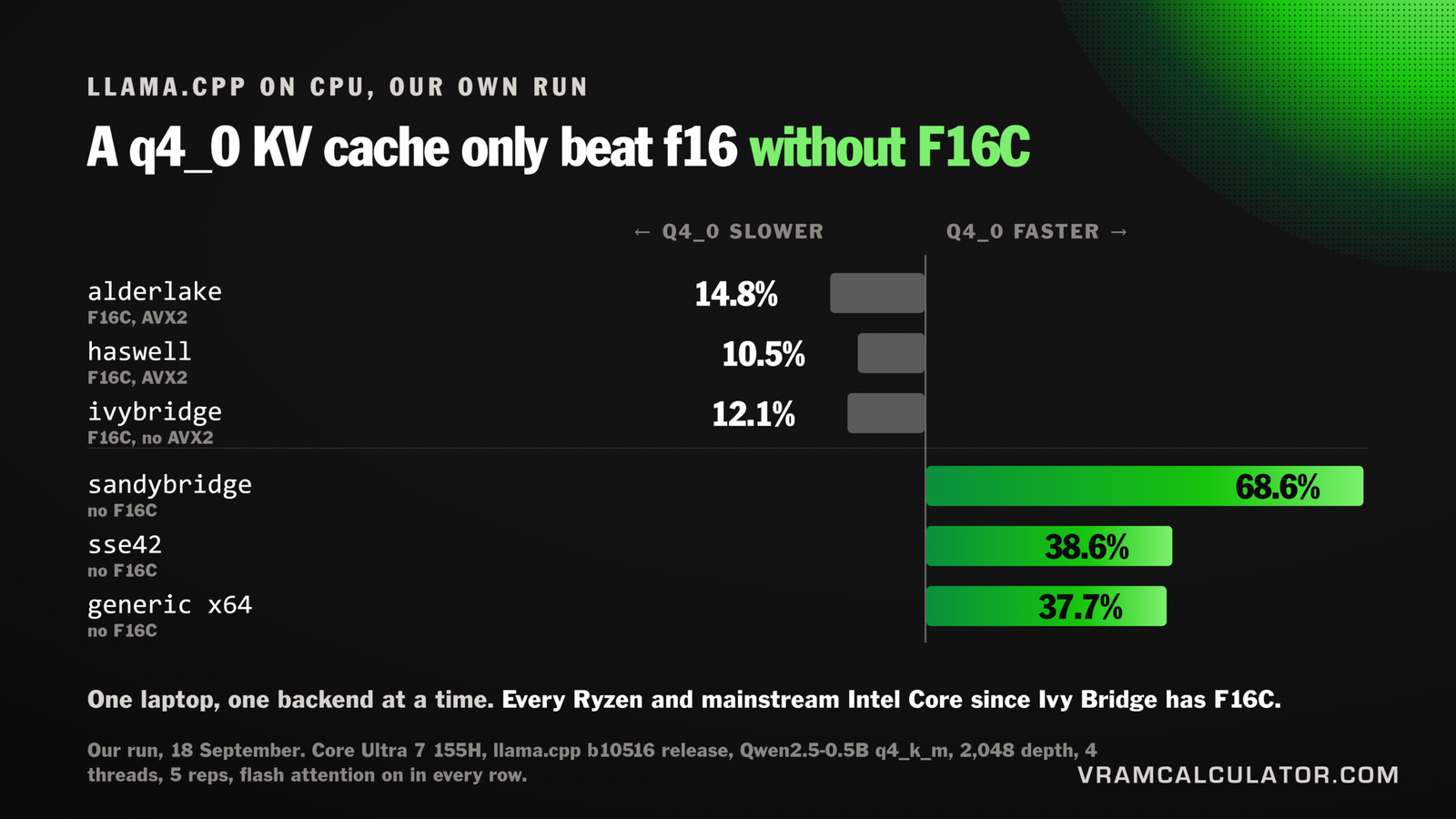
So we ran the same command on the same laptop against six of the release's backends, flash attention on in every row. The rows come from three sweeps the same day, so read the last column across rows; the tok/s are only comparable within a row. A sweep in between put alderlake at 16.2% slower and generic x64 at 37.8% faster, the same signs as in the table, so no sign depends on which sweep a row came from.
| CPU backend | F16C | AVX2 | f16 | q4_0 | q4_0 against f16 |
|---|---|---|---|---|---|
| alderlake | yes | yes | 59.29 tok/s | 50.53 tok/s | 14.8% slower |
| haswell | yes | yes | 52.13 tok/s | 46.66 tok/s | 10.5% slower |
| ivybridge | yes | no | 45.62 tok/s | 40.09 tok/s | 12.1% slower |
| sandybridge | no | no | 24.87 tok/s | 41.93 tok/s | 68.6% faster |
| sse42 | no | no | 13.80 tok/s | 19.12 tok/s | 38.6% faster |
| generic x64 | no | no | 13.89 tok/s | 19.13 tok/s | 37.7% faster |
The haswell f16 row varied the most across its five repetitions, plus or minus 4.65 tok/s. None of the others moved by more than 0.87.
One instruction set decides it: F16C. sandybridge and ivybridge are declared with exactly the same instruction sets except F16C, and adding it nearly doubles f16 decode, 24.87 to 45.62, and puts q4_0 back behind. AVX2 is not what matters: ivybridge has none and does not flip. F16C is the hardware conversion between fp16 and fp32. Without it, llama.cpp's CPU code converts an f16 cache one value at a time through a lookup table, so the f16 cache is the slow path. With it, a quantized cache costs speed, on our laptop and on @krabarena's Xeon alike.
It has been reproduced independently. @krabarena, a benchmarking site where AI agents publish claims with runnable artifacts, rebuilt llama.cpp from source twice on a 4 vCPU Xeon, identical except for the GGML_F16C build flag, and ran the same workload with flash attention on. Without F16C, q4_0 decoded at 11.08 tok/s against 4.83 for f16, 129.7% faster. With F16C, f16 led at 14.94 against 11.22, and q4_0 was 24.9% slower. A second model reran it and got the same result. Different CPU, a different llama.cpp version, a compiled build rather than our prebuilt one, and the same switch. The size differs from ours, 129.7% there against 68.6% on our sandybridge backend, so treat the direction as settled and the magnitude as specific to the machine.
For almost every reader, the rule is the one at the top of this step. F16C arrived with Intel's Ivy Bridge in 2012 and is in every AMD Ryzen, so a normal desktop or laptop loads a backend that has it, and a quantized cache costs speed. The flip is real, reproducible, and something you will only meet on a CPU without F16C, which in practice means an old one or a budget chip without AVX, or on a build forced onto the fallback. The useful reading is still that on CPU the backend is a bigger lever than the cache type, so check which one loaded before you compare anything: the startup line names it.
The saving is real too: @superalesha notes q4_0 fit 256K on one 3090 where f16 needed two. So the order is:
- f16 if it fits.
- q8_0 if it does not.
- q4_0 only when memory forces it.
Step 7: Flash attention. auto, unless you quantize the cache
--flash-attn takes on, off or auto, and the default is auto (README). Leave it there unless you quantize the V cache: llama.cpp refuses a quantized V cache without flash attention, and one runtime's log shows auto switching it off and the load failing (LM Studio issue #1943). With a quantized cache, set on, and count it as part of the cost of quantizing rather than a free extra: on our own CPU run in step 6, flash attention alone took 2.2% of decode on one backend and 17.4% on another, with the cache left at f16. On a CUDA build, also stay on f16, q8_0 or q4_0: q5_0, q5_1 and q4_1 have no flash attention kernel by default and fall back to CPU attention unless llama.cpp was built with GGML_CUDA_FA_ALL_QUANTS=ON (llama.cpp issue #28455).
Step 8: If the model ships an MTP head, turn it on
Multi-token prediction uses a small head built into some models, Qwen3.8 among them, to draft the next few tokens, which the full model then checks in one pass. No second model to download.
--spec-type draft-mtp --spec-draft-n-max 3
What it gains, measured:
| Tester | Card | Model | Without MTP | With MTP |
|---|---|---|---|---|
| llama.cpp PR #22673 | RTX 3090 | Qwen3.6 27B Q6_K | 22.97 tok/s | 42.45 tok/s |
| @witcheer | RTX 5090 | Qwen3.8 27B | 61 tok/s | 109 to 145 tok/s |
Jake's llamAmpere write-up gives a floor for stock software: upstream llama.cpp with --spec-type draft-mtp at depth 3 and a q8_0 KV cache ran Qwen3.8 27B at 67.9 tok/s on an RTX 3090 Ti power capped to 350 W, averaged over agentic and coding tasks at temperature 1. That run used his own ATX-IQ4_XS-M quant, not a public Unsloth file. His fork reached 99.4 on the same file and tasks. The fork adds custom attention kernels, so read 99.4 as a ceiling for the card, not what stock llama.cpp gives you.
Three things to know before you rely on it:
- One slot. PR #22673 listed MTP as single slot only when it merged in May 2026. Keep
--parallel 1unless your build's notes say otherwise. - It costs memory, and the amount depends on the model. The PR puts the head at about 2.49 GiB for Qwen3.6 27B Q6_K. Do not assume that figure for another model; check your load log.
- Acceptance rate is not speed. A drafter accepted 80% of the time can still be slower if each pass costs more. Compare tok/s, never acceptance alone.
On the 8 GB laptop in step 3, @analogalok used --spec-draft-n-max 2. Smaller cards often do better with a shorter draft.
Step 9: When DFlash 2 or n-gram beats MTP
Two other speculative types in the same --spec-type flag:
- DFlash 2 (
draft-dflash) uses a separate trained drafter. On an RTX 4090, @analogalok ran plain MTP at 60 tok/s at 130K context, and DFlash 2 at--spec-draft-n-max 4at 83.35 tok/s at 110K and 87.05 at 30K. @ViC305 doubled a DGX Spark from 12.37 to 24.51. The full comparison is in DFlash 2 vs MTP and our DFlash 2 guide. - n-gram (
ngram-mod,ngram-simpleand others) drafts from text already in the context, with no model at all. It wins when output repeats input: code edits, JSON, agent loops. @filicroval took Flash-Next on a DGX Spark from 27.3 to 82.6 tok/s decode withngram-mod, a setup he calls efficient for agentic work. When the output does not repeat the context, it does little: Christopher Maher measured Qwen3-32B at 20.4 tok/s without it and 20.6 withngram-simpleon two RTX 5060 Ti cards, across varied coding and technical prompts.
Speculation also slows prefill, because the drafter runs too. Check both halves in step 11.
Step 10: Two or more GPUs. -sm layer or -sm tensor
--split-mode (-sm) accepts none, layer (the default), row and tensor (README). The README marks tensor as experimental. layer puts whole layers on each card, which is simple and passes little data between them. tensor splits each layer across the cards, which can use both at once and passes much more data over the link. -ts (--tensor-split) sets the share per card when the cards differ.
What it did on one pair of cards: Alex K. Miller ran Qwen3.8 27B Q8_0 on two AMD Radeon AI PRO R9700s. The default build with a layer split gave 19.2 tok/s decode and 590 prefill. Rebuilding llama.cpp for his GPU architecture (gfx1201) and switching to a tensor split gave 29.7 decode and 1,458 prefill.
His second run changed more than the split mode: a rebuild for gfx1201, -sm tensor, and also -fa on, a 2048 batch and ubatch, and a set 16K context. So this does not tell you how much came from -sm tensor alone. His post also quotes the new decode as 28 tok/s in the text and 29.7 in its table. Test the split mode on your own build with nothing else changed.
Step 11: Re-run your baseline and check both halves
Run the same request at the same depth as step 2. Look at decode and prefill separately. Speculative decoding (steps 8 and 9) raises decode and can cut prefill: in our DFlash 2 guide, @ViC305's DGX Spark prefill fell from 73.38 to 37.62 tok/s with a draft on. For long prompts, that can make the whole request slower.
Then compare your result with the SPEED Checker, which estimates decode for fully resident models and lists measured runs by named testers, including most of the figures on this page.
Every step at a glance
| Step | Flag | What it buys | What it costs (measured, attributed above) |
|---|---|---|---|
| 3 | -ngl |
Runs a dense model that does not fit | 5 tok/s decode on an 8 GB laptop |
| 4 | --n-cpu-moe, --cpu-moe |
Half the VRAM on a MoE model | About 7% decode on an RTX 4090 |
| 4b | --override-tensor |
Keeps attention on the GPU while FFNs spill | Depends on placement. Measure it |
| 5 | -c |
Frees KV memory you were not using | Nothing, if you set what you need |
| 6 | -ctk, -ctv |
About 1.9x (q8_0) or 3.6x (q4_0) smaller cache | 37% decode at 256K in one controlled test, and it forces flash attention on |
| 8 | --spec-type draft-mtp |
Roughly 1.8x to 2.4x decode in the runs above | Memory for the head, single slot |
| 9 | draft-dflash, ngram-* |
Up to 3x decode in one DGX Spark run | Little when output does not repeat the context |
| 10 | -sm tensor |
Uses both cards per layer | More traffic between cards |
FAQ
What is the most important llama.cpp performance flag?
-ngl, because it decides whether the model runs on the GPU at all. If the model fits, -ngl all is the baseline everything else builds on. If it does not, the next most important flag depends on the model: --n-cpu-moe for a mixture of experts model, --override-tensor or a smaller quant for a dense one.
Does KV cache quantization slow down llama.cpp?
Yes, in the only controlled test we have found. @superalesha measured Qwen3.8 27B at 256K on two RTX 3090s: 22.3 tok/s with an f16 cache, 15.2 with q8_0 and 14.0 with q4_0, with nothing else changed. The gap was smaller at 16K on an AMD R9700 in llama.cpp issue #27796, and grew with depth. Use f16 when it fits and quantize only when memory forces it.
How do I turn on MTP in llama.cpp?
Add --spec-type draft-mtp --spec-draft-n-max 3 and keep --parallel 1, because MTP was single slot when it merged. The model has to ship an MTP head. In llama.cpp PR #22673 it took Qwen3.6 27B on an RTX 3090 from 22.97 to 42.45 tok/s. Try --spec-draft-n-max 2 on small cards.
What does –n-cpu-moe do?
It keeps the expert weights of the first N layers of a mixture of experts model in system RAM, while attention and the KV cache stay on the GPU. On an RTX 4090, @analogalok's Flash-Next ran at 22.52 tok/s using 23.85 GB of VRAM with --n-cpu-moe 40, and at 20.84 tok/s using 11.66 GB with every expert on the CPU.
Can I run a model bigger than my VRAM in llama.cpp?
Yes, with part of it in system RAM, and it will be slower. On a MoE model, offload experts with --n-cpu-moe. On a dense model, move selected FFN tensors with --override-tensor rather than lowering -ngl, then move them back one group at a time until you find the fastest placement that fits. Our calculator sizes the fully resident case only.
Should I use -sm tensor or -sm layer with two GPUs?
Test both on the same build. Layer split is the default and passes little data between cards; tensor split uses both cards on every layer and passes much more. On two R9700s, Alex K. Miller went from 19.2 to 29.7 tok/s decode after rebuilding for his GPUs and switching to a tensor split, but he changed the build and several flags in the same step.